
- Overview
- Getting Started
- Quick Start Guide
- Core Concepts
- Users
- Models
- Creating a Model
- Model Card
- Model Card
- Importing Model Card Text
- Comparing Model Cards
- Creating a Release
- Uploading Files
- Uploading Images
- Model Templating
- Data Cards
- Creating a Data Card
- Managing Data Cards
- Using a Model
- Browsing the Marketplace
- Requesting Access
- Using a Pushed Docker Image
- Downloading Files
- Reviews
- Understanding Reviews
- Reviewing
- Reviewing a Release
- Reviewing an Access Request
- Reviewing a Model Card Lifecycle
- Review Outcomes
- Security Scanning
- File Scanning
- Image Scanning
- Inferencing
- Creating an Inference Service
- Managing Inference Services
- Model Mirroring
- Creating a Mirrored Model
- Editing a Mirrored Model Card
- Untrusted Models
- Untrusted Models
- Deletion
- Deleting a File
- Deleting a Model
- Soft Deletion
- Bailo Metrics
- Viewing Bailo Metrics
- Programmatic Access
- Authentication
- Personal Access Tokens
- Python Client
- OpenAPI Reference
- Webhooks
- Administration
- Getting Started
- Deployment Architecture
- App Configuration
- Model Lifecycle Configuration
- LLM
- LLM Import
- Schemas
- Understanding Schemas
- Create a Schema
- Upload a Schema
- Schema Migrations
- Review Roles
- Managing Review Roles
- Assigning Roles to Schemas
- Federation
- Peer Integration
- Microservices
- Artefact Scanners
- Helm
- Basic Usage
- Configuration
- Isolated Environments
- Migrations
- Bailo v0.4
- Bailo v2.0
- DataBase Scripts
- Reference
- Glossary
- Roles & Permissions
- Troubleshooting & FAQ
Scanning Images
Common questions this page answers:
- How are container images scanned in Bailo?
- How do I view vulnerability details for a container image?
- What is a CVE?
- How do I rescan an image?
Using scanner
Container images pushed to the Bailo registry are automatically scanned using Trivy, a vulnerability scanner that detects known security issues called CVEs (Common Vulnerabilities and Exposures).
Trivy is a static analysis tool focused on the security of containers, and informing users about potential issues, packaged in Bailo ArtefactScan. You can read more about the principles and scope of Trivy here.
For scan results:
- Go to your model and click on Registry Tab
- Click the Scan chip, towards the right of your image
- View scan results. Vulnerabilities are classified by severity, listing the amount of each as so:
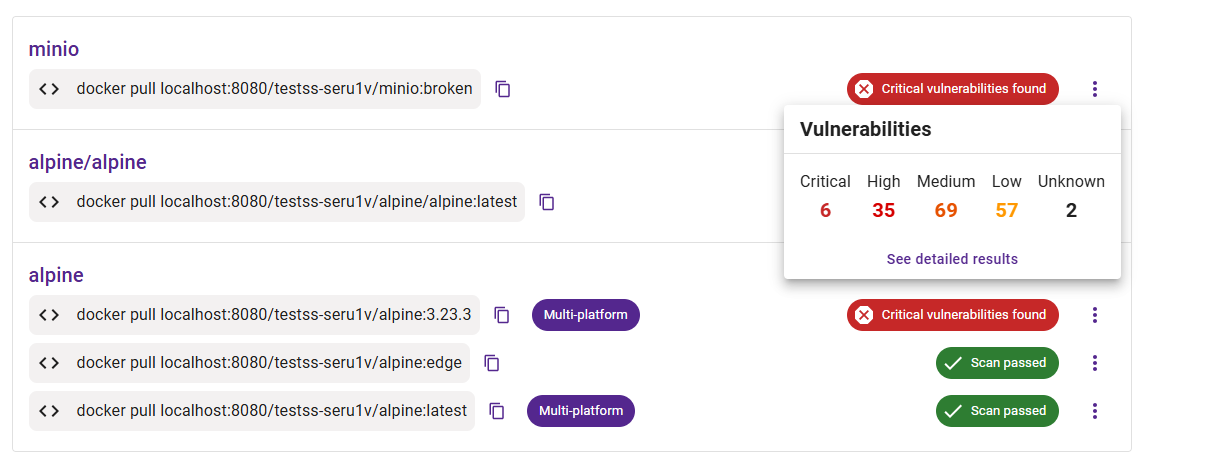
The screenshot above shows the scan status chip on a container image in the Registry tab, with vulnerability counts grouped by severity.
Detailed view
To view more detail, click the 'See detailed results' button. This will take you to the vulnerability report page, which includes the following information:
- Compressed image size
- Vulnerabilities
- Scanner used
- Detailed vulnerability report, containing CVE information
You can filter these results by Severity, using the tags at the top of the page.
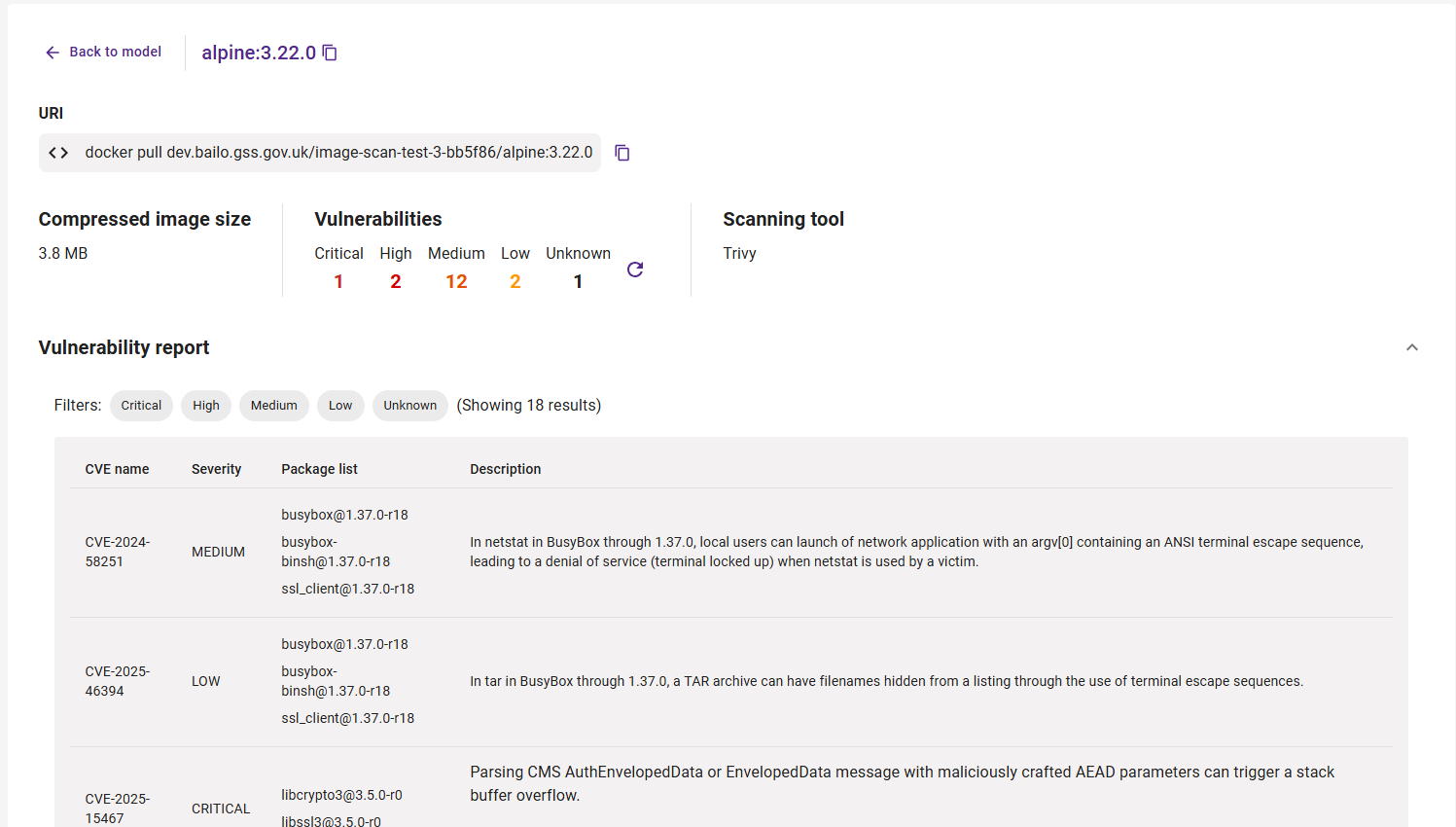
The screenshot above shows the detailed vulnerability report page with CVE information and severity filters.
Rescan image
Trigger a rescan of a container image from the scan results menu.
- Click the 3 dots to the right of the scan results chip
- Click Rerun image scan
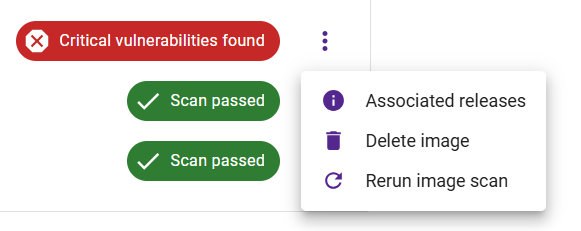
The screenshot above shows the image actions menu with a Rescan option.
Multiplatform images
Bailo supports scanning multiplatform images, which target different architectures.
Bailo also allows you to scan multiplatform images, which are images that point to a different set of layers based on your host architecture. Click the See detailed results button to view the platform-specific, detailed results page.
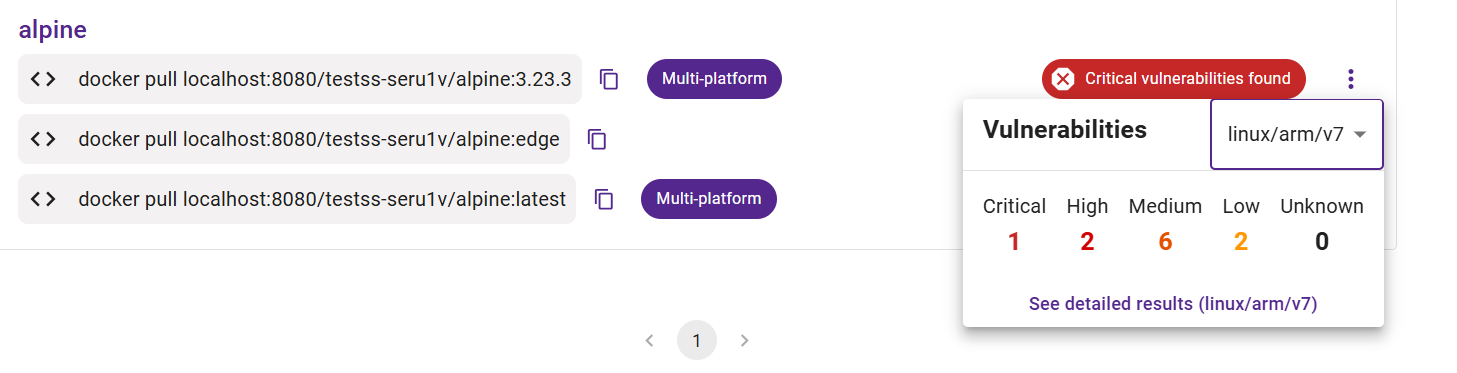
The screenshot above shows a multiplatform image summary with platform-specific vulnerability breakdowns.
Copyright © Crown Copyright 2026.