- Overview
- Getting Started
- Quick Start Guide
- Core Concepts
- Users
- Models
- Creating a Model
- Model Card
- Model Card
- Importing Model Card Text
- Comparing Model Cards
- Creating a Release
- Uploading Files
- Uploading Images
- Model Templating
- Data Cards
- Creating a Data Card
- Managing Data Cards
- Using a Model
- Browsing the Marketplace
- Requesting Access
- Using a Pushed Docker Image
- Downloading Files
- Reviews
- Understanding Reviews
- Reviewing
- Reviewing a Release
- Reviewing an Access Request
- Reviewing a Model Card Lifecycle
- Review Outcomes
- Security Scanning
- File Scanning
- Image Scanning
- Inferencing
- Creating an Inference Service
- Managing Inference Services
- Model Mirroring
- Creating a Mirrored Model
- Editing a Mirrored Model Card
- Untrusted Models
- Untrusted Models
- Deletion
- Deleting a File
- Deleting a Model
- Soft Deletion
- Bailo Metrics
- Viewing Bailo Metrics
- Programmatic Access
- Authentication
- Personal Access Tokens
- Python Client
- OpenAPI Reference
- Webhooks
- Administration
- Getting Started
- Deployment Architecture
- App Configuration
- Model Lifecycle Configuration
- LLM
- LLM Import
- Schemas
- Understanding Schemas
- Create a Schema
- Upload a Schema
- Schema Migrations
- Review Roles
- Managing Review Roles
- Assigning Roles to Schemas
- Federation
- Peer Integration
- Microservices
- Artefact Scanners
- Helm
- Basic Usage
- Configuration
- Isolated Environments
- Migrations
- Bailo v0.4
- Bailo v2.0
- DataBase Scripts
- Reference
- Glossary
- Roles & Permissions
- Troubleshooting & FAQ
Deleting a model
Common questions this page answers:
- How do I delete a model in Bailo?
- What happens when I delete a model?
- Can I recover a deleted model?
Models can be deleted from Bailo by users with the appropriate permissions. Deleting a model removes it from use and visibility across the platform.
Who can delete a model
You must have Delete permission on the model. If you do not have permission, the delete action will be blocked.
What happens when a model is deleted
Deleting a model removes all associated resources, including:
- Model card revisions
- Reviews and responses
- Releases (all versions)
- Docker images and tags
- Files and scans
- Inference records
- Access requests
- Webhooks
- Tokens referencing the model
When you delete a model:
- The model is removed from the Marketplace and search results
- All releases associated with the model are removed
- Files can no longer be downloaded
- Docker images can no longer be pulled or used
- Reviews, access requests, and other related activity are no longer accessible
From a user perspective, the model is gone and cannot be used.
How to delete a model
Delete a model from the Settings tab in the Deletion section:
- Open the model
- Navigate to Settings
- Scroll to the Deletion section
- Click Delete Model
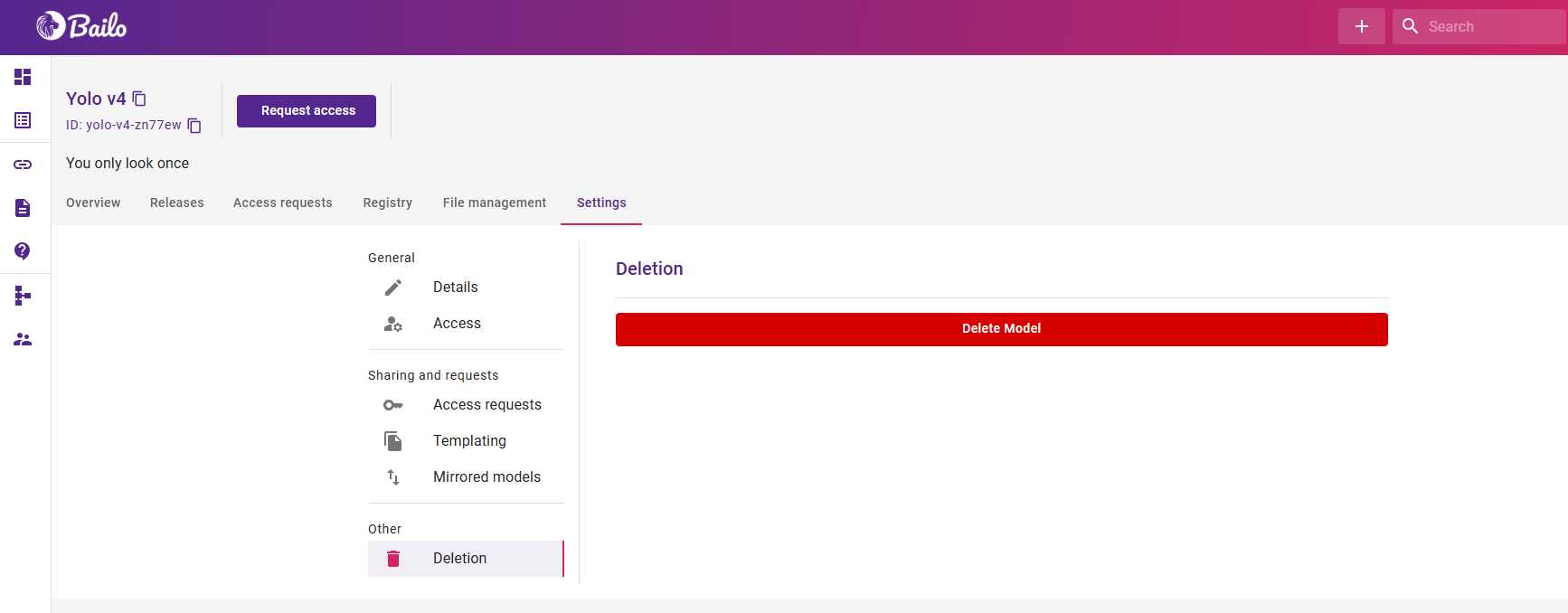
The screenshot above shows the model Settings page with the Deletion section and a Delete Model button.
Confirming deletion
To prevent accidental deletion, you must type the exact model name to confirm deletion:
- A confirmation dialog will appear
- Type the exact model name into the confirmation field
- Click Delete or press Enter once the name matches
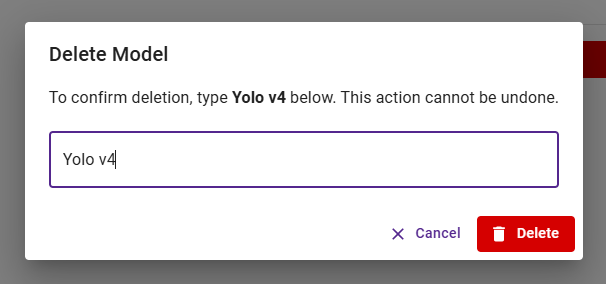
The screenshot above shows the delete confirmation dialog requiring the exact model name to be typed.
If the name does not match exactly, the delete button remains disabled.
After deletion
- The model is immediately made inaccessible to all users
- You are redirected to the Bailo home page
- The action should be treated as permanent
About recovery
Model deletion is designed to be final, with only rare administrator recovery possible.
In exceptional circumstances, platform administrators may be able to restore a deleted model. This is not a standard service and users should only request recovery if absolutely required.
Before deleting a model, ensure it is no longer needed.
See Soft Deletion for more detail.
Copyright © Crown Copyright 2026.