
- Overview
- Getting Started
- Quick Start Guide
- Core Concepts
- Users
- Models
- Creating a Model
- Model Card
- Model Card
- Importing Model Card Text
- Comparing Model Cards
- Creating a Release
- Uploading Files
- Uploading Images
- Model Templating
- Data Cards
- Creating a Data Card
- Managing Data Cards
- Using a Model
- Browsing the Marketplace
- Requesting Access
- Using a Pushed Docker Image
- Downloading Files
- Reviews
- Understanding Reviews
- Reviewing
- Reviewing a Release
- Reviewing an Access Request
- Reviewing a Model Card Lifecycle
- Review Outcomes
- Security Scanning
- File Scanning
- Image Scanning
- Inferencing
- Creating an Inference Service
- Managing Inference Services
- Model Mirroring
- Creating a Mirrored Model
- Editing a Mirrored Model Card
- Untrusted Models
- Untrusted Models
- Deletion
- Deleting a File
- Deleting a Model
- Soft Deletion
- Bailo Metrics
- Viewing Bailo Metrics
- Programmatic Access
- Authentication
- Personal Access Tokens
- Python Client
- OpenAPI Reference
- Webhooks
- Administration
- Getting Started
- Deployment Architecture
- App Configuration
- Model Lifecycle Configuration
- LLM
- LLM Import
- Schemas
- Understanding Schemas
- Create a Schema
- Upload a Schema
- Schema Migrations
- Review Roles
- Managing Review Roles
- Assigning Roles to Schemas
- Federation
- Peer Integration
- Microservices
- Artefact Scanners
- Helm
- Basic Usage
- Configuration
- Isolated Environments
- Migrations
- Bailo v0.4
- Bailo v2.0
- DataBase Scripts
- Reference
- Glossary
- Roles & Permissions
- Troubleshooting & FAQ
Reviewing an Access Request
When a user submits an access request for a model, it enters the review process. Access request reviews are typically handled by the Model Senior Responsible Officer (MSRO) (or equivalent review role configured for the schema).
Common questions this page answers:
- How do I review an access request?
- What happens after I approve an access request?
- Who reviews access requests?
Finding access requests to review
Navigate to the Reviews page from the navigation bar. Access requests awaiting your review appear in the Your open reviews tab.
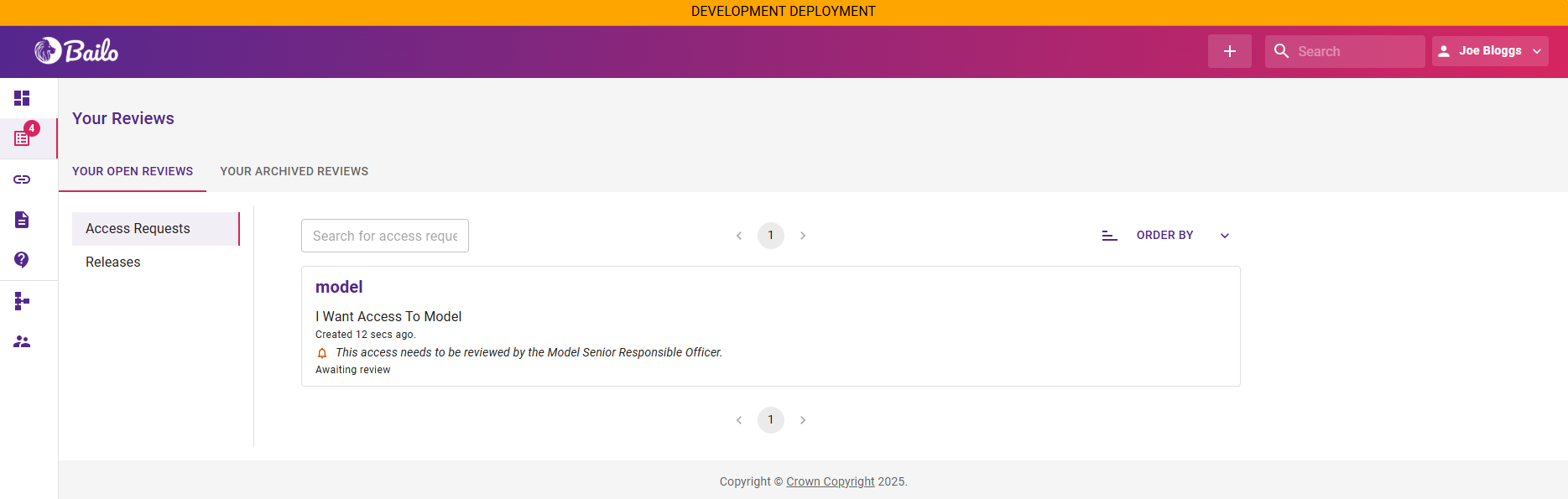
The screenshot above shows the Reviews page with an open access request awaiting review.
Reviewing an access request
Open the access request, examine the requester's details and justification, and submit your decision.
- Select the access request from your review queue
- Click View access request and examine the request details:
- Who is requesting access (the requesting user or group)
- Why they need access (the justification provided in the form)
- What permissions they are requesting
- When the access should expire (if an end date is specified)
- Add a comment explaining your decision
- Choose your decision:
- Approve - grant the requested access
- Request changes - ask the requester to provide more information or modify their request
After approval
Once an access request is approved:
- The requesting user gains permission to download files and pull container images from the model
- The access request moves to the Your archived reviews tab on the Reviews page
- The requester is notified of the approval
After requesting changes
If you request changes:
- The requester is notified and can update their access request
- Once updated, you can review the request again
Related pages
- Understanding Reviews - How the review process works end-to-end
- Review Outcomes - What happens after approval or change requests
- Requesting Access - How users create access requests
Copyright © Crown Copyright 2026.