
- Overview
- Getting Started
- Quick Start Guide
- Core Concepts
- Users
- Models
- Creating a Model
- Model Card
- Model Card
- Importing Model Card Text
- Comparing Model Cards
- Creating a Release
- Uploading Files
- Uploading Images
- Model Templating
- Data Cards
- Creating a Data Card
- Managing Data Cards
- Using a Model
- Browsing the Marketplace
- Requesting Access
- Using a Pushed Docker Image
- Downloading Files
- Reviews
- Understanding Reviews
- Reviewing
- Reviewing a Release
- Reviewing an Access Request
- Reviewing a Model Card Lifecycle
- Review Outcomes
- Security Scanning
- File Scanning
- Image Scanning
- Inferencing
- Creating an Inference Service
- Managing Inference Services
- Model Mirroring
- Creating a Mirrored Model
- Editing a Mirrored Model Card
- Untrusted Models
- Untrusted Models
- Deletion
- Deleting a File
- Deleting a Model
- Soft Deletion
- Bailo Metrics
- Viewing Bailo Metrics
- Programmatic Access
- Authentication
- Personal Access Tokens
- Python Client
- OpenAPI Reference
- Webhooks
- Administration
- Getting Started
- Deployment Architecture
- App Configuration
- Model Lifecycle Configuration
- LLM
- LLM Import
- Schemas
- Understanding Schemas
- Create a Schema
- Upload a Schema
- Schema Migrations
- Review Roles
- Managing Review Roles
- Assigning Roles to Schemas
- Federation
- Peer Integration
- Microservices
- Artefact Scanners
- Helm
- Basic Usage
- Configuration
- Isolated Environments
- Migrations
- Bailo v0.4
- Bailo v2.0
- DataBase Scripts
- Reference
- Glossary
- Roles & Permissions
- Troubleshooting & FAQ
Scanning Files
Common questions this page answers:
- How are files scanned in Bailo?
- What scanners are used for file scanning?
- How do I rescan a file?
Using scanners
When uploading files to Bailo, your files will be automatically scanned (assuming scanners are configured and initialised).
By default, Bailo is configured to use the following scanners:
- ClamAV is an Antivirus tool used for traditional malware detection. You can read more about it here.
- ModelScan is a tool used to prevent model serialisation attacks, across a variety of formats. You can read more about it here. ModelScan is packaged in Bailo ArtefactScan
For scan results:
- Go to your model and click on File Management Tab
- Click the Scan chip, towards the right of your file
- View scan results. Each scanning tool will have its results listed separately
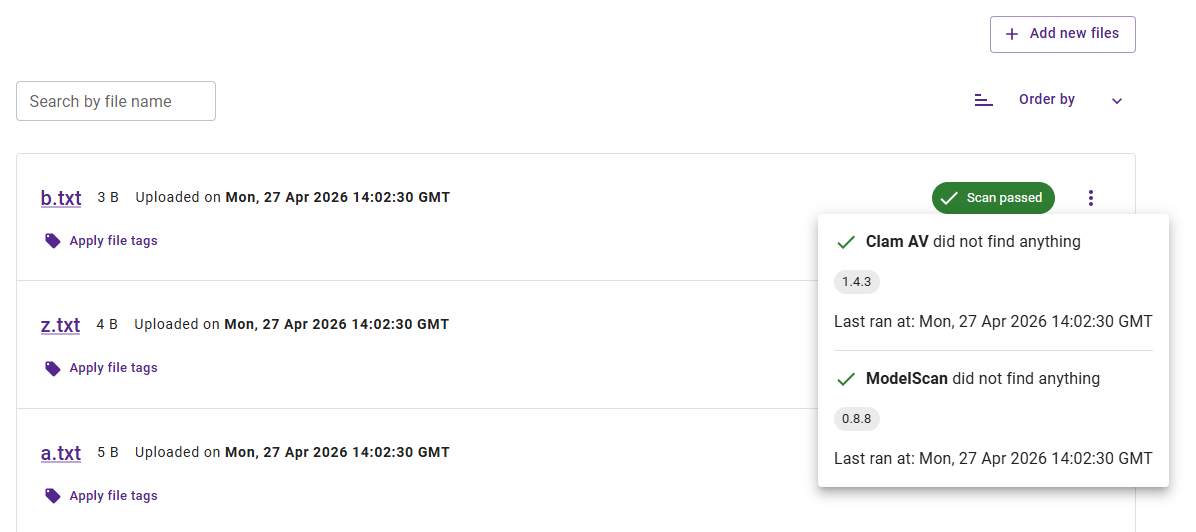
The screenshot above shows a file in the File Management tab with a scan status chip that can be clicked to view scan results.
Rescan file
To rescan a file after it has been uploaded, click the 3 dots to the right of the scan results chip and select the Rescan option.
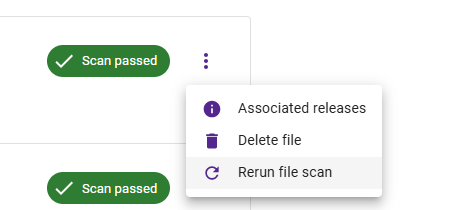
The screenshot above shows the file actions menu with a Rescan option for re-running security scans.
Copyright © Crown Copyright 2026.