
- Overview
- Getting Started
- Quick Start Guide
- Core Concepts
- Users
- Models
- Creating a Model
- Model Card
- Model Card
- Importing Model Card Text
- Comparing Model Cards
- Creating a Release
- Uploading Files
- Uploading Images
- Model Templating
- Data Cards
- Creating a Data Card
- Managing Data Cards
- Using a Model
- Browsing the Marketplace
- Requesting Access
- Using a Pushed Docker Image
- Downloading Files
- Reviews
- Understanding Reviews
- Reviewing
- Reviewing a Release
- Reviewing an Access Request
- Reviewing a Model Card Lifecycle
- Review Outcomes
- Security Scanning
- File Scanning
- Image Scanning
- Inferencing
- Creating an Inference Service
- Managing Inference Services
- Model Mirroring
- Creating a Mirrored Model
- Editing a Mirrored Model Card
- Untrusted Models
- Untrusted Models
- Deletion
- Deleting a File
- Deleting a Model
- Soft Deletion
- Bailo Metrics
- Viewing Bailo Metrics
- Programmatic Access
- Authentication
- Personal Access Tokens
- Python Client
- OpenAPI Reference
- Webhooks
- Administration
- Getting Started
- Deployment Architecture
- App Configuration
- Model Lifecycle Configuration
- LLM
- LLM Import
- Schemas
- Understanding Schemas
- Create a Schema
- Upload a Schema
- Schema Migrations
- Review Roles
- Managing Review Roles
- Assigning Roles to Schemas
- Federation
- Peer Integration
- Microservices
- Artefact Scanners
- Helm
- Basic Usage
- Configuration
- Isolated Environments
- Migrations
- Bailo v0.4
- Bailo v2.0
- DataBase Scripts
- Reference
- Glossary
- Roles & Permissions
- Troubleshooting & FAQ
Creating a Release
A release is a versioned snapshot of your model at a point in time. Releases bundle together files, container images, and a reference to a specific model card version. Creating a release triggers the review process.
Common questions this page answers:
- How do I create a release in Bailo?
- What is semantic versioning?
- What is a minor release?
- What happens after I create a release?
What is a release?
Releases use semantic versioning (e.g. 1.0.0, 1.1.0, 2.0.0) to track changes to a model
over time:
- Major version (first number): significant changes or breaking changes
- Minor version (second number): new features or improvements
- Patch version (third number): bug fixes or small updates
Creating a release
You create a release from the Releases tab on your model page by filling in a version number, release notes, and attaching files or images:
- Open your model page and go to the Releases tab
- Click Draft new Release
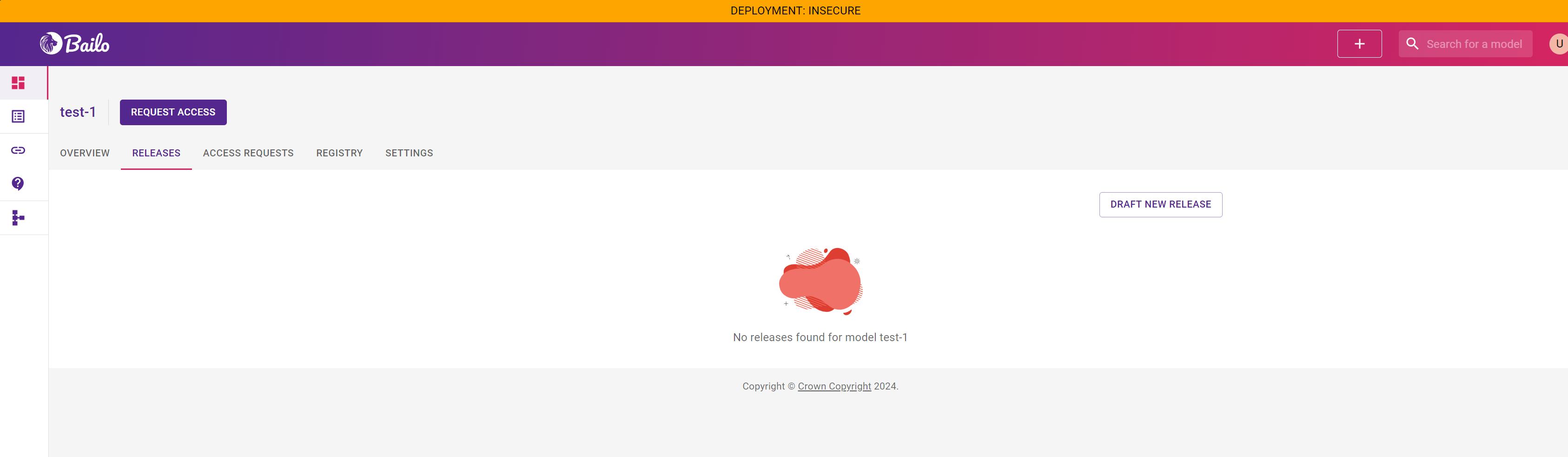
The screenshot above shows the Releases tab with no releases yet and a 'Draft new Release' button.
- The release form opens with the following fields to complete:
- Semver - the version number for this release (e.g.
1.0.0) - Release notes - describe what is included in this release
- Files - attach uploaded files to this release
- Images - attach container (Docker) images to this release
- Semver - the version number for this release (e.g.
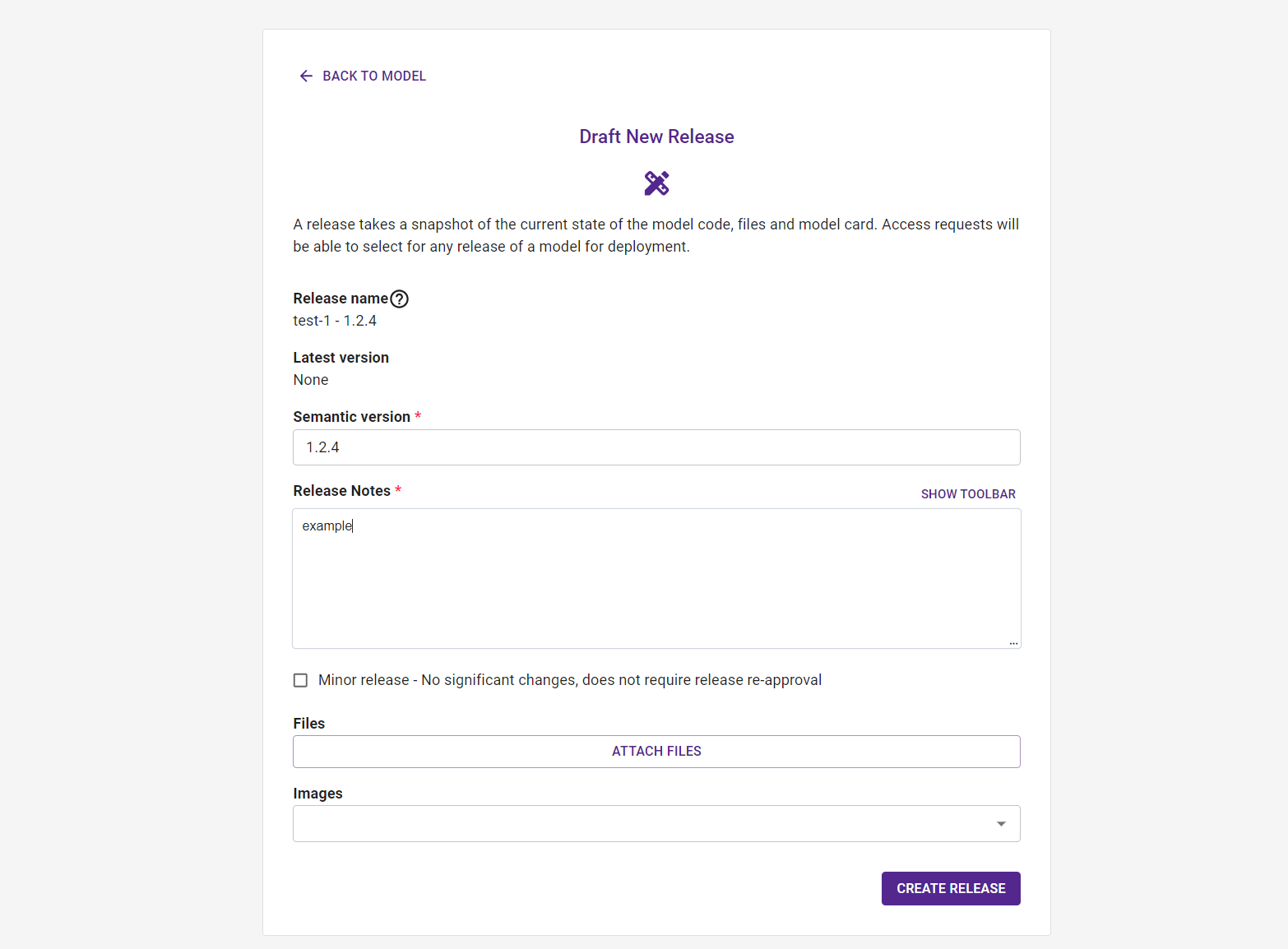
The screenshot above shows the release creation form with fields for version number, release notes, file attachments, and container image attachments.
- Once you have filled in the release details and attached any artefacts, click Create Release to submit
Draft vs published releases
Releases are initially created as drafts. Draft releases can be edited before they are finalised. Once all required reviews are approved, the release is considered published.
Minor releases
You can mark a release as a minor release to bypass the review workflow. This is intended for small, low-risk updates that do not materially change the behaviour or purpose of the model.
Typical examples include:
- Correcting documentation or release notes
- Updating non-functional files (e.g. README updates)
- Minor packaging or metadata adjustments
- Replacing files with equivalent versions that do not change model behaviour
Key points:
- No review is created when a release is marked as minor
- The release becomes available immediately after creation
- The minor flag cannot be changed after the release is created
- Minor releases should not be used for model updates, behavioural changes, or anything requiring governance review
If a change could affect model performance, outputs, safety, or intended use, you should create a standard release so that it goes through the full review process.
What happens after creation
Creating a release triggers the review process, notifying all assigned reviewers:
- All review roles assigned to the model are notified
- Each reviewer evaluates the release
- Once all required roles approve, the release is finalised
- If any reviewer requests changes, you'll be notified to update the release
Editing a release
You can update a release's notes, files, and images after creation:
- Navigate to the Releases tab
- Select the release you want to edit
- Click Edit release
- Update the release notes, files, or images
- Save your changes
Related pages
- Uploading Files - Adding files to your model
- Uploading Images - Pushing container images
- Understanding Reviews - The review process
- Python Client - Creating releases programmatically
Copyright © Crown Copyright 2026.