StroomQL Grammar
This page sets out the grammar of
StroomQl
StroomQl
Notation
The grammar uses the following notation:
<name>- A part of the grammar defined elsewhere on this page.[ ... ]- An optional part.{ ... }- A part that may appear any number of times, including none.a | b- Eitheraorb.- Anything else is written as it appears in a query.
Keywords such as from, where and join are case-insensitive.
Field names are case-sensitive.
Query
A query is a from clause, then any join lines, then the other clauses.
<query> :=
  from <source> [as <alias>] [sql <native query>]
  { <join line> }
  [where <condition>]
  { eval <name> = <expression> | <window> }
  [filter <condition>]
  { group by <columns> | sort by <sort columns> }
  [having <condition>]
  [limit <number> {, <number>}]
  select <select columns>
  [show <visualisation> (<control> = <column> {, <control> = <column>})]
The clauses must come in the order shown, with these exceptions:
evalandwindowmay come in any order, andevalmay be repeated. A query can have only onewindow, see Window.group byandsort bymay come in any order, andgroup bymay be repeated to make nested groups.limitcomes beforeselect.
show needs a select before it.
Sources
<source> := <data source> | ( <bracketed query> )
<data source> := <name> | "<name with spaces>"
<alias> := <name>
A data source is named as it appears in Stroom, in double quotes if its name has spaces.
The first source may be given an alias with as.
Its fields can then be named either bare, as in UserId, or with the alias, as in logon.UserId.
A bracketed query is a whole query in brackets, starting with from, whose results become the rows of the source, e.g.
from (
  from "Windows events"
  group by UserId
  select UserId, count() as Logons
) as l
where Logons > 10
select UserId, Logons
A bracketed query can’t have a show clause, and can’t have joins, an alias or a bracketed query of its own.
In a join line, a bracketed query needs an alias.
When the first source is a bracketed query, its rows only appear once it has been searched.
All of the outer where is then tested on the joined rows, as filter is, so it doesn’t narrow any source’s search.
To narrow a source, put the condition inside its bracketed query.
The alias of a data source with no as is its name.
If the name has spaces, its fields are written in braces, e.g. ${HR Users.Department}.
The query’s time range applies to every source whose data source has a time field, including joined sources and bracketed queries.
Native Query
<native query> := """<text>""" | "<text>" | '<text>'
A sql clause gives the query a data source runs itself, such as the SQL of a JDBC or Amazon Athena Data Connection, or the filter of an LDAP one.
It comes straight after the source it is for: after from, or after a joined data source in a join line.
A bracketed query has its sql clause inside its brackets, straight after its own from.
A triple-quoted string is taken exactly as written: it can span several lines and hold " and \ without escaping, and it ends at the next """.
A data source that needs a sql clause refuses a query without one, and one that doesn’t take one refuses a query with one.
Join Lines
<join line> := <join kind> <source> [as <alias>] [sql <native query>]
               on <key> {and <key>} [<join window>]

<join kind> := join | inner join
             | left join | left outer join
             | right join | right outer join
             | full join | full outer join
             | semi join | left semi join
             | anti join | left anti join

<key> := <expression> = <expression>

<join window> := within <duration> after <time field>
          | within <duration> before <time field>
Each join line joins one more source, the joined source, to the rows of the query so far.
Join lines come straight after from, and each one is joined in the order written.
The joined source’s alias defaults to its data source’s name. A joined bracketed query must have an alias. Each alias must be different from the others and from the first source’s.
Each key compares a field of the joined source with a field of the rows it is joined to, which may be a field of the first source or of an earlier join.
Either side of a key may be an expression, e.g. lowerCase(UserId) = hr.Username, but not an aggregate function such as count().
Keys are compared exactly, as text, so case matters, and a blank or null key never matches.
Join Kinds
In the diagrams, A is the first source, or the rows joined so far, and B is the joined source. Shaded areas are the rows given. A dashed B means none of B’s fields are added.
Join
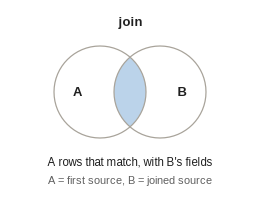
join, also written inner join, gives one row for each match.
A row with no match is dropped.
Left Join
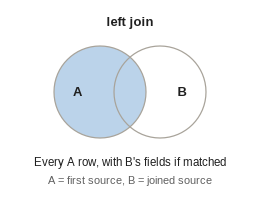
left join, also written left outer join, gives one row for each match.
A row with no match is kept, with blank joined fields.
Right Join
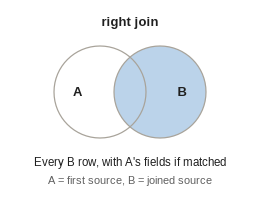
right join, also written right outer join, gives one row for each match.
A row of the joined source with no match is given once, with blank fields of the first source.
Full Outer Join
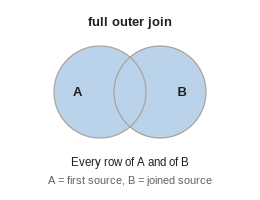
full join, also written full outer join, gives one row for each match.
A row of either source with no match is given once, with blank fields of the other.
Semi Join
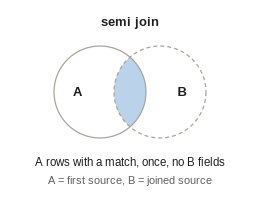
semi join, also written left semi join, gives each row that has at least one match, once, without adding any joined fields.
where exists and where ... in are other ways of writing it, see Exists and In.
Anti Join
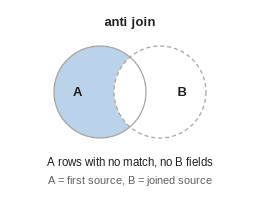
anti join, also written left anti join, gives each row that has no match, without adding any joined fields.
where not exists and where ... not in are other ways of writing it, see Exists and In.
Joined Fields
The fields of a joined source are named <alias>.<field>, e.g. hr.Department, and can be used anywhere a field can.
A semi or anti join adds no fields, so its fields can only be used in its own keys, or, for a semi join, in where conditions that are moved into its own search.
The hidden StreamId, EventId and AnnotationId fields come from the first source only, so a joined row still opens and annotates the first source’s event.
Right and Full Joins
A right or full join must be the last join line, and can’t be used with the exists and in forms of where.
It can’t have a time window.
The rows of the joined source that matched nothing are given once the first source has been searched, so they come last. If the search does not finish, they are left out, with a warning.
Time Windows
A join with a time window joins events to events. A joined event matches when its keys match and its time, from its data source’s time field, is within the window:
within 10m after logon.EventTime- from the first source’s time to 10 minutes after it.within 10m before logon.EventTime- from 10 minutes before the first source’s time to that time.
The time field must be a field of the first source, and the joined data source must have a time field. A query with a time window can have only one join line, joining a data source to a data source.
The first source is searched first and held, with the same limits as a joined source, so keep it small. The joined source is then searched only within the windows of its rows, and no more of its events than the row limit may fall within them. The rows appear once both have been searched.
Where
<condition> := <term>
             | <condition> and <condition>
             | <condition> or <condition>
             | not <condition>
             | ( <condition> )

<term> := <field> = <value>
        | <field> != <value>
        | <field> > <value>
        | <field> >= <value>
        | <field> < <value>
        | <field> <= <value>
        | <field> between <value> and <value>
        | <field> is null
        | <field> is not null
        | <field> in (<value> {, <value>})
        | <field> in dictionary <dictionary>
        | exists ( <exists query> )
        | not exists ( <exists query> )
        | <field> in ( <in query> )
        | <field> not in ( <in query> )
filter and having take the same conditions as where, apart from the exists and in forms.
See Filter for how filter differs from where, and Having for what else having takes.
A dictionary is named by its name or its
UUID
UUID
4ffeb895-53c9-40d6-bf33-3ef025401ad3.
Where with Joins
where may name any field, including joined fields.
It is split at its top level and:
- A part that names only fields of the first source is moved into the first source’s search. With a right or full join it is instead tested on the joined rows, as the rows of the joined source with no match have blank fields of the first source.
- A part that names only fields of one joined source is moved into that source’s search, for a
joinorsemi joinon a data source. - Every other part, including an
orthat names fields of more than one source, is tested on the joined rows.
When the first source is a bracketed query, all of where is tested on the joined rows.
To narrow a joined source, or to use a semi join’s fields, put the condition inside a bracketed query for that source.
A join, semi join or right join also narrows the first source’s search to the joined source’s keys, as an in condition, when:
- It has one key, whose first-source side is a plain field of the first source, not an expression.
- The first source can search that field with
in, and it is an ID, number, keyword or text field. - The joined source has at most 1,000 different keys, each a plain value without spaces, commas, quotes or wildcards.
An anti join does the same with not in, but only on ID and whole-number fields.
If a where condition tested on the rows of a right or full join names a field of the first source that never had a value, a warning says so.
This happens when a data source can search a field but not give its value.
Narrow the first source with a bracketed query in from instead.
Exists and In
<exists query> := from <data source> [as <alias>] [sql <native query>]
                  where <condition>

<in query> := from <data source> [as <alias>] [sql <native query>]
              [where <condition>]
              select <field>
These forms are the SQL ways of writing semi and anti joins, and run as them:
existsandinare semi joins.not existsandnot inare anti joins.
They can only be used at the top level of where, joined to the rest of it by and, and not inside a bracketed query.
The where of an exists query compares fields of the first source with fields of its own source, using = only.
It names the first source’s fields by the first source’s alias, or by its data source’s name if it has no alias, e.g.
from People as p
where exists (from Teams as t where t.team = p.team and t.on_call = true)
select name, team
Its other conditions narrow its own search.
An in query selects exactly one field, which is compared with the field before in, e.g.
from People
where team not in (from Teams select team)
select name, team
A blank key never matches, so not in keeps a row whose field is blank, and a blank value in the other source doesn’t stop any row from being kept.
This differs from SQL, where not in gives no rows once the other query holds a null.
Filter
filter <condition>
where and filter both keep only the rows that match a condition, but they are tested at different points:
whereis the search itself. It is passed to the data source, which uses it to find the matching events, e.g. by looking them up in an index.filteris tested by Stroom on each row the search gives, once the row’s values have been retrieved and anyevalhas been worked out. A row that doesn’t match is dropped beforewindow,group by,sort byandlimitare applied, so it is not counted or grouped.
The two clauses differ as follows:
where |
filter |
|
|---|---|---|
| Tested by | The data source, as part of its search. | Stroom, on each row the search gives. |
| Names | Fields of the data source that it can search, e.g. the indexed fields of an index. | Columns of select, by column name, which is the name after as if there is one. |
eval variables |
Can’t be named. | Can be named, if selected. |
| Matching | As the data source matches the field, e.g. an indexed text field is matched as its analyser splits it into words. | The value of the column is compared with the value given. |
exists and in queries |
Allowed. | Not allowed. |
| Cost | Narrows the search, so fewer events are retrieved. | Every event the search finds is retrieved before it is tested. |
A filter on a name that is not a column of select fails with a Field not found error.
filter compares values as follows:
- If the value given is a date or a number, the column’s value is compared as one. Otherwise it is compared as text.
- Text is compared without regard to case.
- In text compared with
=or!=,*stands for any number of characters and?for one character. Put\before either to match it as written.
For example, this query uses where to find one feed’s events in the index, then filter to keep the rows with a value that only eval gives:
from "Windows events"
where Feed = "WINDOWS-EVENTS"
eval Domain = substringAfter(UserId, "@")
filter Domain = "example.*"
select UserId, Domain
Use where wherever the data source can search the field, and filter only for what where can’t test.
To test the result of an aggregate function, such as count(), use having.
With joins, an alias or a bracketed query in from, some or all of where is tested on the joined rows as filter is, see Where with Joins.
Those conditions still name fields, not columns.
Window
<window> := window <time field> by <duration> [advance <duration>] [offset [-]<duration>]
window puts each row into windows of time by the value of its time field, and groups the rows by window as well as by the group by columns.
The functions windowStart() and windowEnd() give the times of a row’s window, and lag() and lead() give the value of an aggregate in an earlier or later window.
- A time field that the data source lists as other than a date is refused. A row with no time in the field is left out.
- The size, advance and offset can’t be in
ns. - A window includes its start and not its end.
- Without
advance, each window starts where the one before it ends. Withadvance, a window starts every advance, and a row is in every window that covers its time. - The size must be a whole number of advances. A year can advance by months, a week by days or less and a day by hours or less, but months and years can’t advance by weeks, days or less.
- Sizes in
hor less are fixed lengths of time counted from midnight. Sizes ind,w,Mandyfollow the calendar in the time zone of the query, with weeks starting on Monday. offsetmoves the start of every window later, or earlier with a minus sign.advanceandoffsetcan be given in either order.- A query can have only one
window, and it can’t be used with the time window of a join. lag()andlead()can’t be used without awindow.
See Window for examples.
Having
having <having condition>

<having condition> := <condition>
                    | <expression> <comparison> <expression>

<comparison> := = | != | > | >= | < | <=
having is tested on each row once its group has been worked out, so it can test the result of an aggregate function.
As well as the conditions that where takes, either side of a comparison can be an expression, e.g. having count() > lag(count(), 1) * 2.
Conditions of both kinds can be joined with and, or and not.
- A single name on the right of a comparison is a column if an
evalorselectgives one of that name, and text if not. - A row is kept only if the comparison is true, so a row where either side has no value is left out.
- An expression that starts with a bracket is allowed, e.g.
having (count() - lag(count(), 1)) > 10.
Values
<value> := <number>
         | "<text>" | '<text>' | <text>
         | <date time>
         | <date expression>
         | param("<parameter>")

<date time> := yyyy-MM-ddTHH:mm:ss.SSSZ
<date expression> := <date point> {+ <date duration> | - <date duration>}
<date point> := now() | second() | minute() | hour() | day() | week() | month() | year()
<date duration> := <number>( s | m | h | d | w | M | y )
<duration> := <number>( ns | ms | s | m | h | d | w | M | y )
<duration> is used by window and by the time window of a join.
Quoted text can hold its quote character escaped with \, e.g. 'O\'Brien'.
A param("<parameter>") value takes the value of the query parameter of that name.
In an Embedded Query panel on a dashboard, ${<parameter>} in the query text is replaced with the dashboard’s parameter of that name before the query runs.
Elsewhere, ${...} names a field.
The values in an in (...) list can only be numbers, text and date times, not date expressions or parameters.
Expressions
An expression in eval, having or a join key is a field, a value, or a call to an Expression Function, and may use +, -, *, /, % and ^.
A column in select is a field, * or a single function call, such as count().
Use eval for anything else, such as arithmetic.
A field whose name has spaces is written in braces after a dollar sign, e.g. ${Create Time}.
Group, Sort, Select and Show
<columns> := <field> {, <field>}
<sort columns> := <field> [asc | desc] {, <field> [asc | desc]}
<select columns> := <select column> {, <select column>}
<select column> := ( <field> | <function call> | * ) [as <column name>]
sort by is ascending by default.
select * selects every field.
limit takes one number for each level of grouping, separated by commas.
show names a
Visualisation
and gives a column for each of its controls, e.g. show LineChart(x = EventTime, y = count).
Comments
// A comment to the end of the line
/* A comment that can span lines */
Limits
- A joined source is held while the first source is searched, up to 1,000,000 rows or 256 MB.
With a time window, the first source is held instead, with the same limits.
A query that joins more fails, suggesting that the joined source is filtered or grouped.
Administrators set these limits with the
search.resultStore.joinMaxRowsandsearch.resultStore.joinMaxSizeproperties. - A query with a
windowadds a row to its results once for each window the row is in, and once more for each of those for each different distance used bylag()andlead(). A query that would add a row more than 100 times is refused. Administrators set this limit with thesearch.resultStore.maxWindowCopiesPerEventproperty. - A join may use at most 255 fields of a joined source.
- A warning is given when a row matches more than 1,000 rows of a joined source.
- Streaming and table builder analytic rules can’t use joins, an alias or a bracketed query in
from, as they run on one event at a time as it is processed.