AWS Application Load Balancer
Running Stroom behind an AWS Application Load Balancer that authenticates users against Amazon Cognito, Microsoft Entra ID or any other Open ID Connect provider.
Normally Stroom is its own Open ID Connect client, or Relying Party: it redirects the browser to the
Identity Provider (IDP)
Identity Provider (IDP)
An Identity Provider is a system or service that can authenticate a user and assert their identity. Identity providers can support single sign on (SSO), which allows the user to sign in once to the Identity Provider so they are then authenticated to all systems using that IDP.Click to see more details..., exchanges the authorization code for tokens, and holds them in its session.
That is the model described by Internal IDP and External IDP.
Some environments put an authenticating reverse proxy in front of Stroom instead. The proxy completes the OIDC flow before a request ever reaches Stroom, holds the tokens itself, and injects a verified credential into each request it forwards. Examples include:
authenticate-cognito or authenticate-oidc listener rule, which injects a signed x-amzn-oidc-data header.lua-resty-openidc), which relays the IDP’s token as an Authorization: Bearer header.The proxy can authenticate against any OIDC provider — Amazon Cognito, Microsoft Entra ID, KeyCloak, Google and so on. The proxy’s mechanism determines most of the Stroom configuration; the provider behind it changes only a few settings, listed under What Depends on the IDP.
This is common in cloud and government estates where a policy requires that unauthenticated traffic never reaches the application. Stroom supports it as a first class deployment model.
edgeAuthentication configuration, available from Stroom 7.13.
For any given path, exactly one component runs the OIDC flow — the proxy, or Stroom, never both.
If Stroom is left in its normal configuration behind an authenticating proxy, both try to be the Relying Party.
The browser is driven through a second, redundant OIDC flow stacked on the one the proxy already completed, which needs a second client registration at the IDP, doubles the cookies on every request, and typically fails with Stroom Loading, Authentication Error: Failed to Fetch.
Setting edgeAuthentication.enabled tells Stroom the proxy owns the flow.
Stroom then:
edgeAuthentication.enabled set, all browser access must go through the proxy.
A browser that reaches Stroom directly (an internal load balancer, a port forward) has no way to sign in, because Stroom will not start a flow.
Direct machine access is unaffected: API keys and bearer tokens work as they always have.
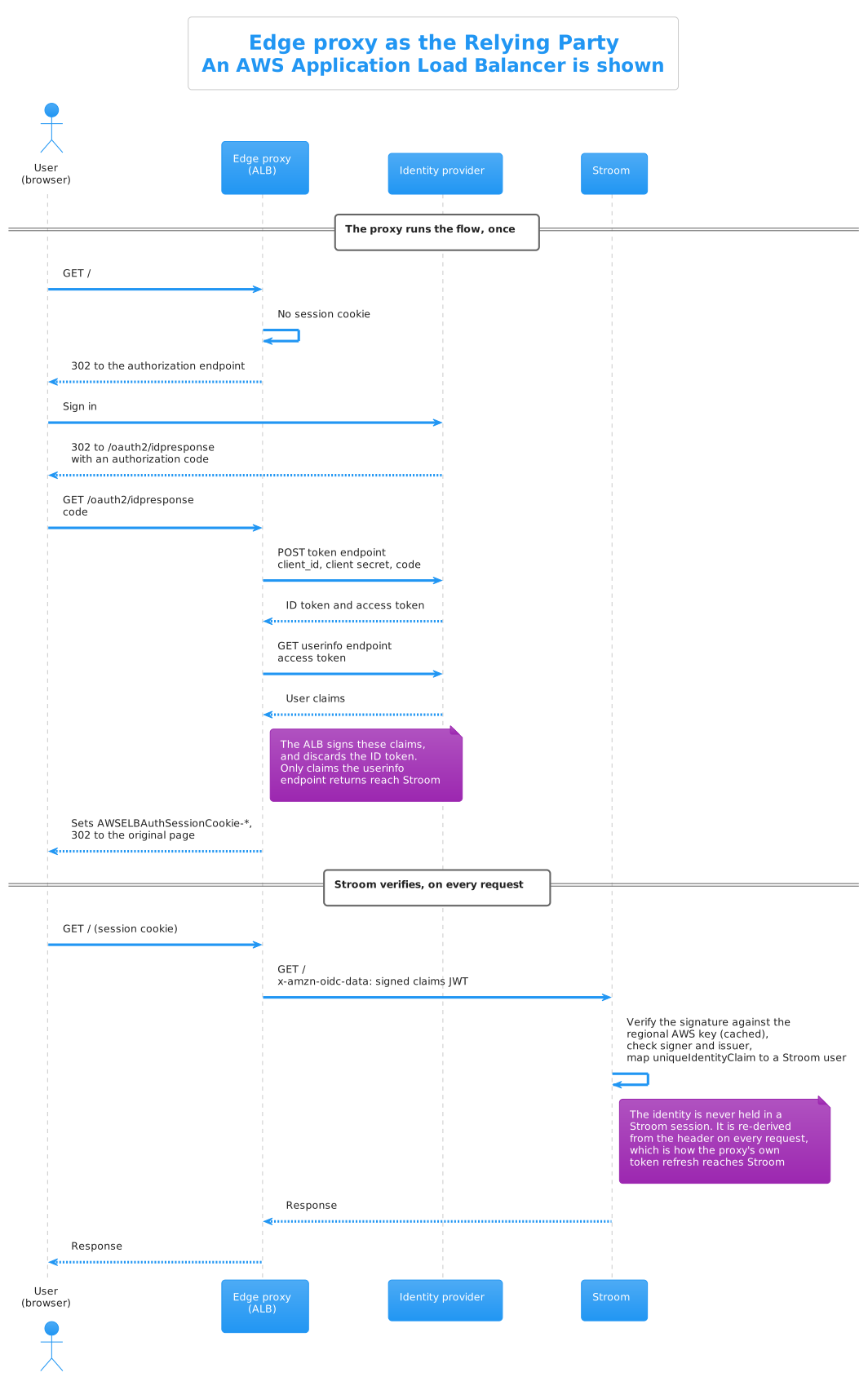
The proxy completes the whole Open ID Connect flow before Stroom sees anything, then injects a credential that Stroom verifies on each request.
Two things in that sequence are easy to miss, and both matter:
logout.cookiesToExpire and logout.signOutUrl are for.Compare this with the External IDP flow, where Stroom performs every step the proxy performs above.
  security:
    authentication:
      edgeAuthentication:
        enabled: true
        logout:
          cookiesToExpire: [ "PROXY_SESSION_COOKIE_PREFIX" ]
          signOutUrl: "PROXY_OR_IDP_SIGN_OUT_URL"
      openId:
        identityProviderType: EXTERNAL_IDP
        # ... provider settings, see the worked examples ...
edgeAuthentication.enabledDeclares that the proxy is the Relying Party, with the effects described above.
Requires identityProviderType: EXTERNAL_IDP; Stroom will refuse to start otherwise.
edgeAuthentication.logout.cookiesToExpireSigning out of Stroom does not end the proxy’s session by itself; without help, the very next request would silently sign the user straight back in. This setting lists the proxy’s session cookie name prefixes, which Stroom expires when the user logs out.
They are prefixes because proxies shard large session cookies: an ALB’s AWSELBAuthSessionCookie arrives as AWSELBAuthSessionCookie-0, -1 and so on, and oauth2-proxy chunks _oauth2_proxy the same way.
edgeAuthentication.logout.signOutUrlWhere to send the browser after logging out of Stroom, normally the proxy’s or IDP’s own sign out endpoint, so the session ends everywhere.
For an ALB it is the IDP’s end session endpoint (Cognito’s hosted UI /logout, Entra ID’s oauth2/v2.0/logout); for oauth2-proxy it is the proxy’s own /oauth2/sign_out.
If it is not set, Stroom logs a warning at each logout: the proxy session survives, and the user may be signed straight back in.
The sign out endpoint will normally return the browser to a post logout landing page given in the URL, and Stroom does not provide one — in edge mode every Stroom page is behind the proxy’s authenticate rule, and Stroom cannot show a sign in prompt of its own.
The deployment has to supply it, as a page the proxy serves without authentication.
The worked examples use a /signed-out page served by the proxy itself.
csrf.protectBrowserOriginatedRequestsOn by default, and independent of edgeAuthentication.
It rejects a state changing request whose token arrived on a request the browser marked as cross site, unless the request carries the X-CSRF header.
Browsers do not let a cross site page attach an Authorization header, so such a token can only have been injected by a proxy — this is the safety net for a proxy that nobody declared in the configuration.
Non browser clients are unaffected, as they send none of the browser fetch metadata this check relies on.
X-CSRF: 1 header on state changing requests.
Scripts, curl and other non browser automation are unaffected.
Stroom is not only a web application; it ingests data, serves health checks and its nodes talk to each other. None of that traffic can complete an interactive sign in, so the proxy’s authenticate rule must cover the browser facing paths only.
| Path | Proxy rule | Why |
|---|---|---|
/, /stroom/*, /ui/* |
Authenticate | The UI |
/api/* |
Authenticate | Browser API calls |
/datafeed (and its legacy aliases) |
Bypass | Data receipt from Stroom-Proxies and clients, authenticated by certificate, token or API key |
/remoting/remotefeedservice.rpc |
Bypass | Feed status RPC |
/status |
Bypass | Health checks |
/signed-out (or similar) |
Serve at the proxy | The post logout landing page, see signOutUrl |
Admin port (/stroomAdmin) |
Bypass | Should not be publicly exposed at all |
Stroom still authenticates the bypassed paths itself — bypassing the proxy does not bypass Stroom’s own checks.
Node to node traffic inside a cluster does not go through the proxy and needs no special handling.
Stroom verifies the signature of whatever credential the proxy injects, so a forged header does not authenticate. Two things must still be true of the deployment, and Stroom cannot verify them from the inside:
x-amzn-oidc-* headers; with NGINX make sure proxy_set_header is used for the Authorization header, which overwrites, and nothing upstream re-adds it.Authenticating proxies make requests big. An ALB’s session cookie is sharded at 4KB per shard, and the injected token headers come on top, so an ordinary authenticated request can exceed the 8KB per request default that Jetty applies when nothing is configured. The failure looks like a network error, not an authentication error.
Set a larger limit on every Stroom node:
server:
  applicationConnectors:
    - type: http
      port: 8080
      useForwardedHeaders: true
      maxRequestHeaderSize: 32KiB
Exactly as with any external IDP, the proxy establishes who the user is; Stroom still decides what they may do. A Stroom user record is created automatically the first time a verified identity is seen, with no permissions. Anyone the IDP will authenticate can therefore reach an empty Stroom UI, so if that is not wanted, restrict who can authenticate at the IDP or proxy (for example, limit the Cognito app client to a group, or require assignment on the Entra ID enterprise application).
The proxy decides how the identity reaches Stroom, and that fixes most of the configuration. The IDP behind the proxy only affects:
| Setting | Why it varies |
|---|---|
openIdConfigurationEndpoint |
The IDP’s discovery document, which supplies the issuer that the injected token is checked against |
clientId |
The proxy’s client at the IDP, which is the audience of a relayed IDP token |
uniqueIdentityClaim, userDisplayNameClaim |
Which claims are present depends on the IDP and on the proxy: an ALB signs the IDP’s user info claims, while oauth2-proxy relays the ID token, and the two can differ for the same IDP |
logout.signOutUrl |
The IDP’s end session endpoint and the name of its return address parameter |
| Client secret rotation | The secret lives at the proxy, so an expiring secret (Entra ID’s, for example) is renewed there |
The External IDP page for your provider is still the reference for creating the client, but do not copy its Stroom configuration wholesale: clientSecret, requestScopes and any claim advice based on the ID token may not apply.
The worked examples spell out the differences.
x-amzn-oidc-data header.| Symptom | Likely cause |
|---|---|
Authentication Error: Failed to Fetch at the loading screen |
edgeAuthentication.enabled not set, so Stroom started a second flow of its own; or the proxy session lapsed (Stroom reloads the page once to let the proxy re-authenticate, then shows this) |
| Browser bounces between Stroom and the IDP forever | Two Relying Parties: Stroom is running its own flow behind the proxy. Set edgeAuthentication.enabled |
HTTP 403 with Authenticated user is not permitted to use stroom |
The proxy’s credential verified, but the user is unknown or disabled in Stroom, or the token could not be validated - check the issuer and (for an ALB) expectedSignerPrefixes |
| Requests fail with what looks like a network error | Header size - set maxRequestHeaderSize |
| Data feeds or health checks broken | The proxy’s authenticate rule covers a machine path - see the path table above |
| Signing out signs the user straight back in | logout.cookiesToExpire / logout.signOutUrl not set, or the post logout page is behind the proxy’s authenticate rule |
| Signing out ends at an IDP error page | The post logout landing URL is not registered against the client at the IDP, or the IDP uses a different parameter name for it |
Log says Expecting claims to contain configured uniqueIdentityClaim 'X' but it is not there |
The proxy forwards a different claim set from the one the External IDP page assumes, e.g. an ALB forwards Entra ID’s user info claims, which on the v2.0 endpoints have no oid. The log line lists the claims that did arrive; use one of those, normally sub |
| Users have no display name | userDisplayNameClaim names a claim the proxy does not forward; check what actually arrives, see What Depends on the IDP |
Running Stroom behind an AWS Application Load Balancer that authenticates users against Amazon Cognito, Microsoft Entra ID or any other Open ID Connect provider.
Running Stroom behind NGINX with oauth2-proxy authenticating users against KeyCloak (or any Open ID Connect provider).