Stroom Configuration
A reference for every Stroom and Stroom-Proxy setting involved in authenticating against an external identity provider.
You may be running Stroom in an environment with an existing
Identity Provider (IDP)
Identity Provider (IDP)
An Identity Provider is a system or service that can authenticate a user and assert their identity. Identity providers can support single sign on (SSO), which allows the user to sign in once to the Identity Provider so they are then authenticated to all systems using that IDP.Click to see more details... (KeyCloak, Cognito, Google, Active Directory, etc.) and want to use that for authenticating users.
Stroom supports 3rd party IDPs that conform to the
Open ID Connect
specification.
authenticate-cognito or authenticate-oidc rule, NGINX with oauth2-proxy - you want Edge Proxy RP, not this page.
This page describes what Stroom needs from any such provider. It applies whichever provider you use, so read it before following one of the provider specific pages.
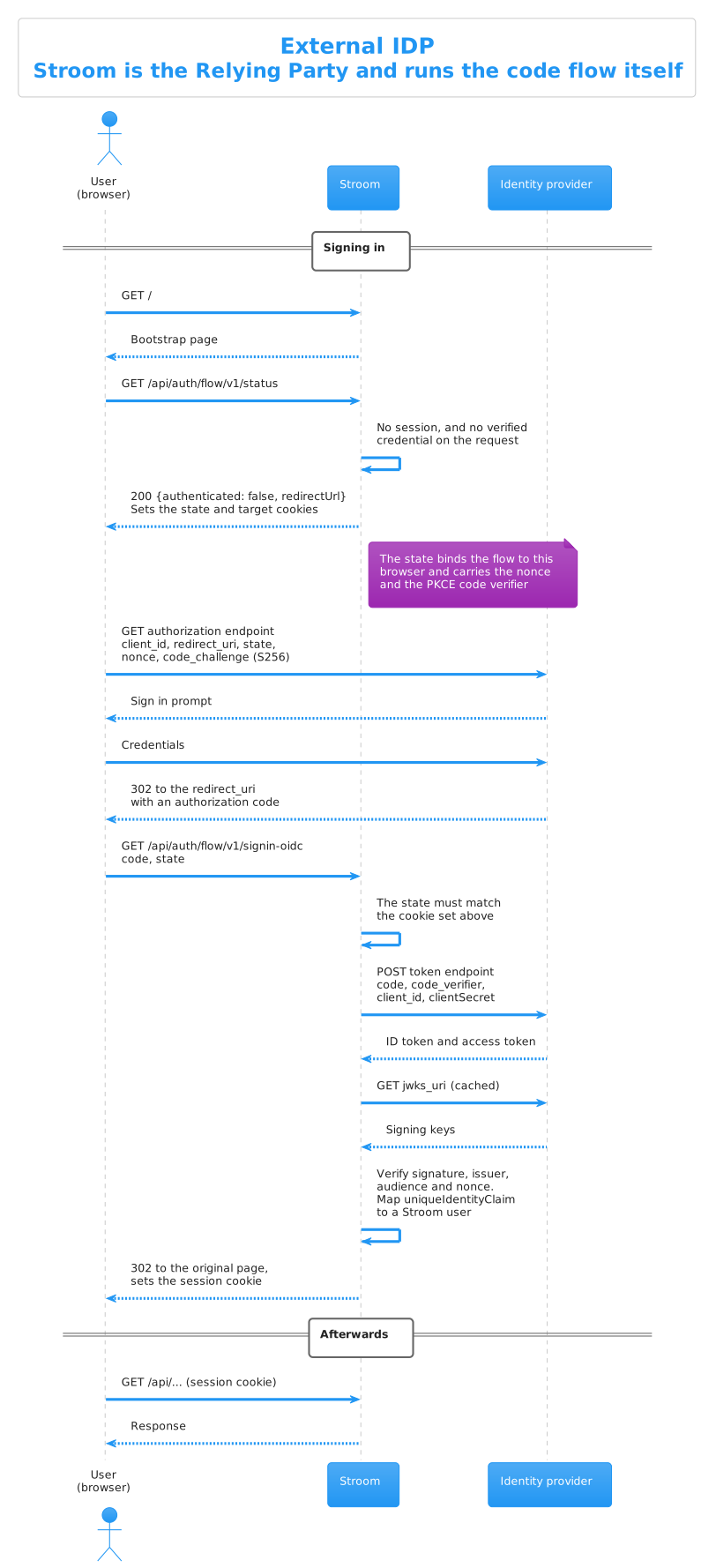
Stroom is the Open ID Connect client, or Relying Party, and runs the authorization code flow itself.
The requirements in the rest of this page are all steps in that sequence: the redirect URI the IDP sends the code to, the PKCE challenge and verifier, the claims Stroom reads from the ID token, and the token validation it performs before creating the session.
Stroom is a confidential OAuth 2.0 client using the authorization code flow. To register it with a provider you need the following.
| What | Value |
|---|---|
| Client type | Confidential, i.e. one that is issued a client secret. Stroom is a server side application and keeps its secret on the server. |
| Grant type / flow | Authorization code. Stroom does not use the implicit or password flows. |
| Redirect URI | https://STROOM_FQDN/api/auth/flow/v1/signin-oidc (see below) |
| Post logout redirect URI | https://STROOM_FQDN/ (see below) |
| PKCE | Supported, and may be required (see below) |
| Scopes | openid and email by default |
STROOM_FQDN is the public facing address of Stroom, which is what you have configured as appConfig.publicUri and is the address users type into their browser.
If Stroom is behind a load balancer or Nginx, it is that address and not the address of an individual node.
The redirect URI, sometimes called the callback or reply URL, is where the provider sends the user’s browser once they have authenticated.
Stroom uses a single fixed redirect URI:
https://STROOM_FQDN/api/auth/flow/v1/signin-oidc
Register that exact value. It does not vary with the page the user was trying to reach, so there is no need to register a wildcard, and you should not do so. The page the user came from is remembered separately by Stroom and does not travel through the provider.
https://STROOM_FQDN/* at the provider.
That is no longer how it works.
If you are upgrading, replace any such wildcard with the single exact URI above, otherwise sign in will be refused by the provider.
If Stroom is served under a path prefix, i.e. appConfig.publicUri.pathPrefix is set, that prefix comes before /api.
When a user signs out, Stroom sends them to the provider’s logout endpoint and asks to be returned to Stroom’s public root:
https://STROOM_FQDN/
Stroom appends a state query parameter to that URI.
Providers that match post logout redirect URIs exactly may need to be told to permit it, so if sign out leaves the user on an error page at the provider, that is the usual cause.
The name of the parameter Stroom uses to pass this URI is controlled by logoutRedirectParamName, which may be post_logout_redirect_uri, the default and current specification, or redirect_uri for older providers.
Stroom always sends a
PKCE
code_challenge using the S256 method, and the matching code_verifier when it exchanges the authorization code for tokens.
There is nothing to configure in Stroom for this. Providers that require PKCE, and anything following OAuth 2.1, will be satisfied, and providers that do not support it ignore the extra parameters. Where the provider lets you insist on PKCE, as KeyCloak does, you can safely turn that on.
Stroom reads three things about a user from the token.
| Setting | Default | Purpose |
|---|---|---|
uniqueIdentityClaim |
sub |
Links the identity at the provider to a Stroom user. Must be unique at the provider and must never change for a given person. |
userDisplayNameClaim |
preferred_username |
A friendlier name shown in the Stroom UI. Need not be unique and may change. |
fullNameClaimTemplate |
${name} |
Builds the user’s full name from claim values, e.g. '${given_name} ${family_name}'. |
Not every provider issues preferred_username, so check the provider page before assuming the defaults will do.
uniqueIdentityClaim to an email address or a username.
Both can be reassigned to a different person at the provider, and whoever holds it next would inherit the Stroom user, along with its permissions.
Stroom validates every token it is given, whether that is the id_token from an interactive sign in or a bearer access token presented to the API.
The signature must verify against a key from the provider’s JWKS, and the algorithm must be one of the RSA, RSA-PSS or ECDSA families. Unsigned tokens and tokens signed with an HMAC algorithm are refused.
The issuer must match what the provider advertised, and the audience must match what Stroom expects.
Audience validation is the part most likely to need attention, because providers differ in what they put in the aud claim of an access token.
See Audience validation.
id_tokens carry an aud claim holding the client id at every provider, so interactive sign in works with the default settings.
It is API authentication with access tokens where providers differ.
Authentication is handled by the provider. Authorisation, i.e. what a user may do once they are in, is always handled by Stroom.
Whenever a user successfully signs in via the provider, Stroom automatically creates an entry for them in its own user table. That user starts with no permissions and no group memberships, so an administrator must grant those. This does mean a new user has to sign in once before an administrator can do anything with them.
The very first administrator is a chicken and egg problem, since there is nobody able to grant permissions yet.
That is solved with the manage_users command, described on each provider page.
A reference for every Stroom and Stroom-Proxy setting involved in authenticating against an external identity provider.
How to set up KeyCloak as an external identity provider for Stroom.
How to set up an Amazon Cognito user pool as an external identity provider for Stroom.
How to set up Google as an external identity provider for Stroom.
How to set up Microsoft Entra ID, formerly Azure Active Directory, as an external identity provider for Stroom.