Stroom's Internal IDP
By default a new Stroom instance/cluster will use its own internal
Identity Provider (IDP)
Identity Provider (IDP)
Note
_test variant of the Stroom Docker stack also uses the internal
Identity Provider (IDP)
Identity Provider (IDP)
In this configuration, Stroom acts as its own Open ID Connect Identity Provider and manages both the user accounts for authentication and the user/group permissions, (see Accounts and Users).
A fresh install can create a user account called admin with the password admin, which is a member of a
group
Group (users)
Administrators holding the Administrator application permission.
This admin user can then be used to set up the other users on the system.
This bootstrap account is only created when stroom.security.identity.autoCreateAdminAccountOnBoot is set to true, which is not the default.
The password is deliberately weak, and by default Stroom requires it to be changed at the first login, governed by stroom.security.identity.passwordPolicy.forcePasswordChangeOnFirstLogin.
Without that property, no account is created and nobody will be able to log in to a new installation. You must instead create the first administrator from the command line.
See Also
Additional user accounts are created and maintained using
See User Accounts for managing those accounts, and Signing In for what users experience.
The Flow
Stroom runs the same authorization code flow as it does against an external IDP, but both ends of it are Stroom.
It hosts its own authorization, token and key endpoints under /oauth2/v1, checks the password against its own account records, and signs the token with its own signing key.
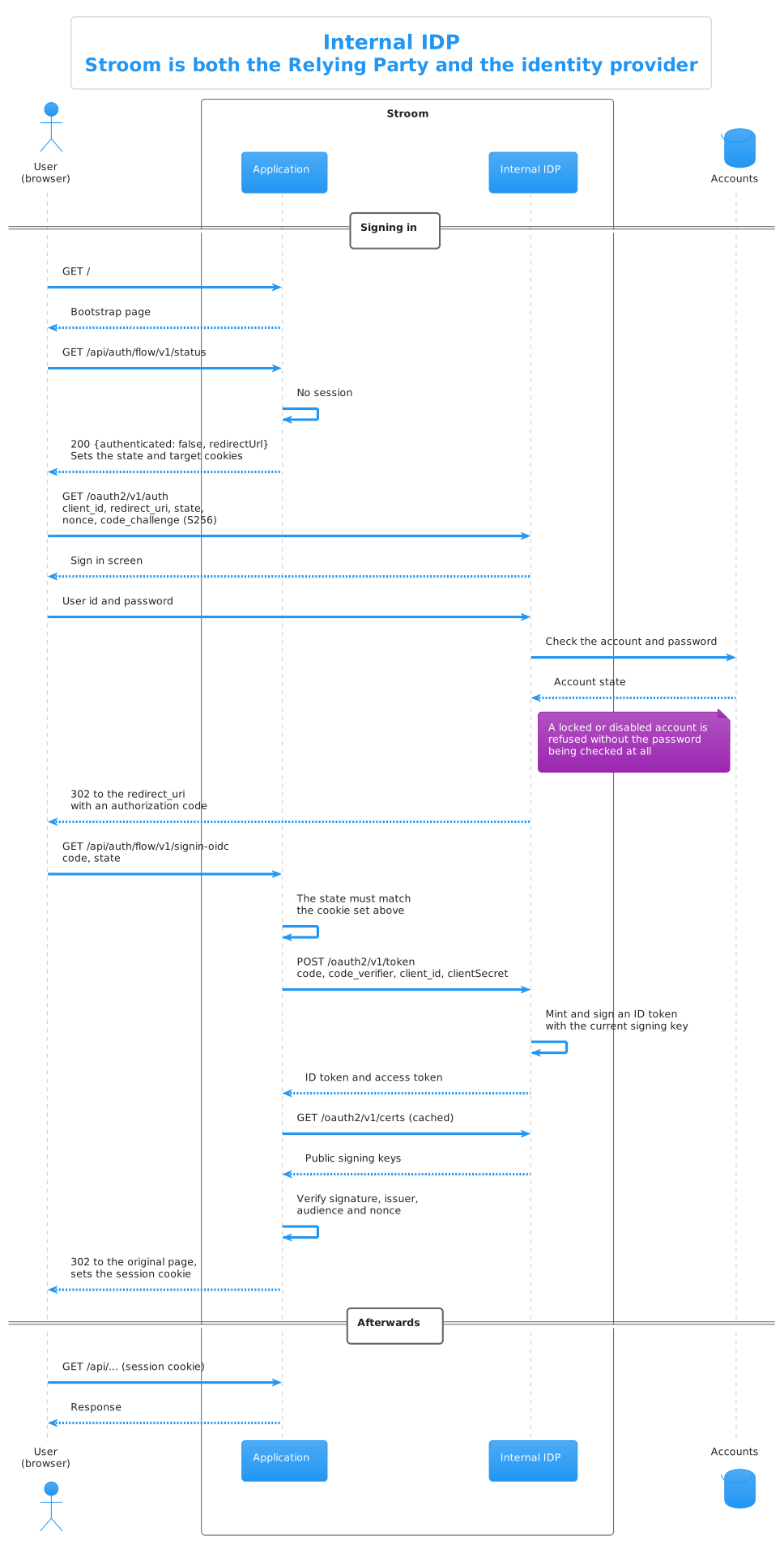
See Also
Configuration for the Internal IDP
While Stroom is pre-configured to use its internal IDP, this section describes the configuration required.
In Stroom:
  security:
    authentication:
      authenticationRequired: true
      openId:
        identityProviderType: INTERNAL_IDP
In Stroom-Proxy:
  feedStatus:
    apiKey: "AN_API_KEY_CREATED_IN_STROOM"
  security:
    authentication:
      openId:
        identityProviderType: NO_IDP