This is the multi-page printable view of this section.
Click here to print.
Return to the regular view of this page.
Edge Proxy as the Relying Party
Running Stroom behind an authenticating reverse proxy, such as an AWS Application Load Balancer or NGINX with oauth2-proxy, that completes the Open ID Connect flow itself against Cognito, Entra ID, KeyCloak or any other provider.
Normally Stroom is its own Open ID Connect client, or Relying Party: it redirects the browser to the
Identity Provider (IDP)
Identity Provider (IDP)
An Identity Provider is a system or service that can authenticate a user and assert their identity. Identity providers can support single sign on (SSO), which allows the user to sign in once to the Identity Provider so they are then authenticated to all systems using that IDP.
Click to see more details..., exchanges the authorization code for tokens, and holds them in its session.
That is the model described by Internal IDP and External IDP.
Some environments put an authenticating reverse proxy in front of Stroom instead.
The proxy completes the OIDC flow before a request ever reaches Stroom, holds the tokens itself, and injects a verified credential into each request it forwards.
Examples include:
- An AWS
Application Load Balancer
with an
authenticate-cognito or authenticate-oidc listener rule, which injects a signed x-amzn-oidc-data header.
- NGINX with
oauth2-proxy
(or NGINX Plus’s native OIDC support, or
lua-resty-openidc), which relays the IDP’s token as an Authorization: Bearer header.
The proxy can authenticate against any OIDC provider — Amazon Cognito, Microsoft Entra ID, KeyCloak, Google and so on.
The proxy’s mechanism determines most of the Stroom configuration; the provider behind it changes only a few settings, listed under What Depends on the IDP.
This is common in cloud and government estates where a policy requires that unauthenticated traffic never reaches the application.
Stroom supports it as a first class deployment model.
Note
This model requires the edgeAuthentication configuration, available from Stroom 7.13.
The One Rule: Exactly One Relying Party
For any given path, exactly one component runs the OIDC flow — the proxy, or Stroom, never both.
If Stroom is left in its normal configuration behind an authenticating proxy, both try to be the Relying Party.
The browser is driven through a second, redundant OIDC flow stacked on the one the proxy already completed, which needs a second client registration at the IDP, doubles the cookies on every request, and typically fails with Stroom Loading, Authentication Error: Failed to Fetch.
Setting edgeAuthentication.enabled tells Stroom the proxy owns the flow.
Stroom then:
- Accepts the proxy’s injected credential, verified cryptographically on every request, as the user’s identity.
The identity is never held in a Stroom session; it is re-derived from the headers on every request, which is also how the proxy’s own token refresh reaches Stroom.
- Never starts an OIDC flow of its own, and disables its OIDC callback endpoint.
- Treats the injected credential as needing Cross-Site Request Forgery (CSRF) protection on browser requests, because the browser attaches the proxy’s session cookie automatically, even to cross site requests.
- Can end the proxy’s session on logout, not just its own.
Warning
With edgeAuthentication.enabled set, all browser access must go through the proxy.
A browser that reaches Stroom directly (an internal load balancer, a port forward) has no way to sign in, because Stroom will not start a flow.
Direct machine access is unaffected: API keys and bearer tokens work as they always have.
The Flow
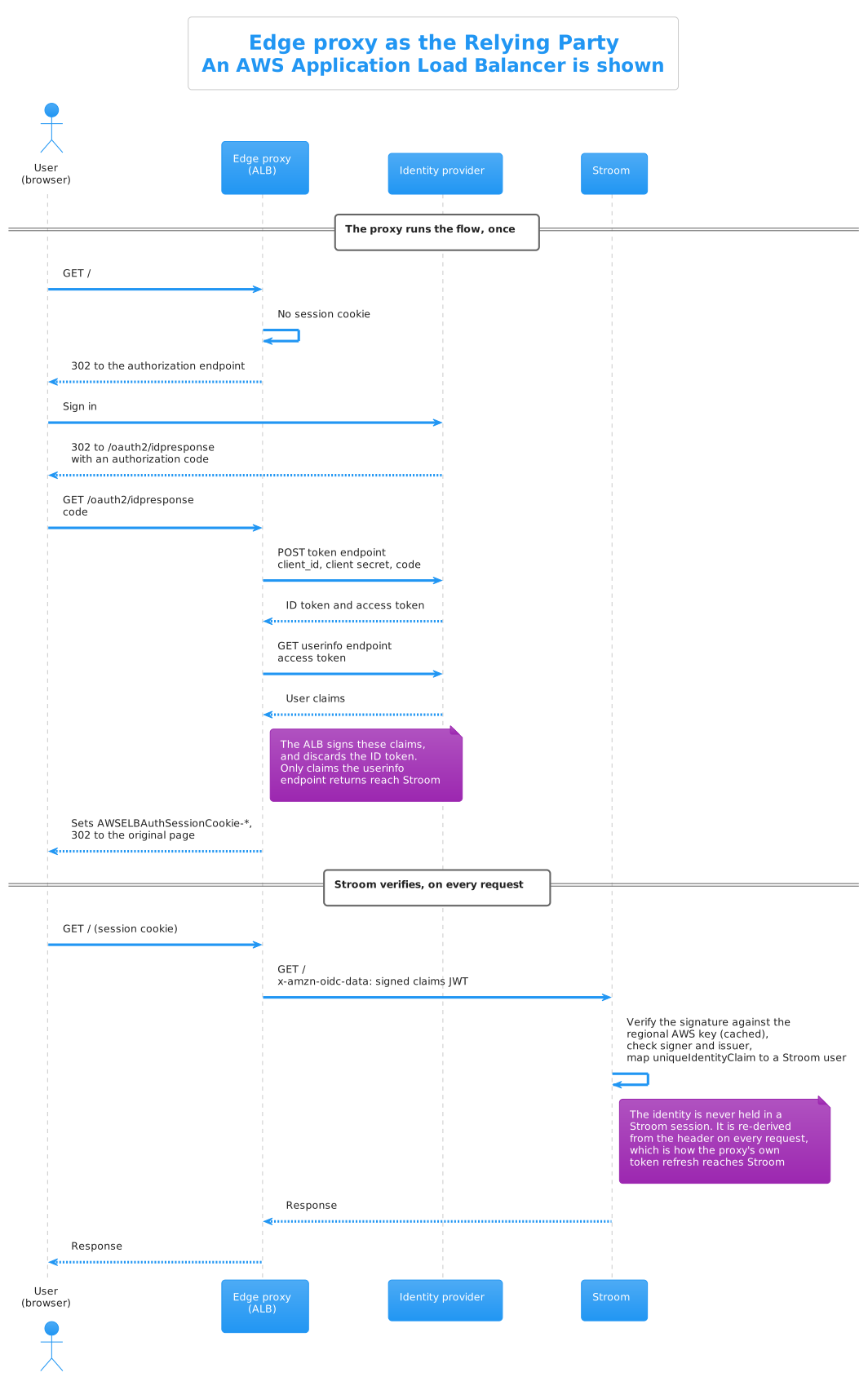
The proxy completes the whole Open ID Connect flow before Stroom sees anything, then injects a credential that Stroom verifies on each request.
Two things in that sequence are easy to miss, and both matter:
- Stroom never authenticates from a session.
The identity is derived from the injected header on every request, which is also how the proxy’s own token refresh reaches Stroom.
A Stroom session is still created, because parts of the application need one, and it appears in the sessions list with no user against it.
Expiring it does not sign the user out, because the next request re-derives them from the header.
Signing out is therefore a matter of ending the proxy’s session, which is what
logout.cookiesToExpire and logout.signOutUrl are for.
- What the proxy injects is not necessarily the IDP’s own token.
An ALB signs the claims it fetched from the IDP’s user info endpoint, while oauth2-proxy relays the IDP’s token itself, and the claims available differ accordingly.
See What Depends on the IDP.
Compare this with the External IDP flow, where Stroom performs every step the proxy performs above.
Stroom Configuration
  security:
    authentication:
      edgeAuthentication:
        enabled: true
        logout:
          cookiesToExpire: [ "PROXY_SESSION_COOKIE_PREFIX" ]
          signOutUrl: "PROXY_OR_IDP_SIGN_OUT_URL"
      openId:
        identityProviderType: EXTERNAL_IDP
        # ... provider settings, see the worked examples ...
edgeAuthentication.enabled
Declares that the proxy is the Relying Party, with the effects described above.
Requires identityProviderType: EXTERNAL_IDP; Stroom will refuse to start otherwise.
edgeAuthentication.logout.cookiesToExpire
Signing out of Stroom does not end the proxy’s session by itself; without help, the very next request would silently sign the user straight back in.
This setting lists the proxy’s session cookie name prefixes, which Stroom expires when the user logs out.
They are prefixes because proxies shard large session cookies: an ALB’s AWSELBAuthSessionCookie arrives as AWSELBAuthSessionCookie-0, -1 and so on, and oauth2-proxy chunks _oauth2_proxy the same way.
edgeAuthentication.logout.signOutUrl
Where to send the browser after logging out of Stroom, normally the proxy’s or IDP’s own sign out endpoint, so the session ends everywhere.
For an ALB it is the IDP’s end session endpoint (Cognito’s hosted UI /logout, Entra ID’s oauth2/v2.0/logout); for oauth2-proxy it is the proxy’s own /oauth2/sign_out.
If it is not set, Stroom logs a warning at each logout: the proxy session survives, and the user may be signed straight back in.
The sign out endpoint will normally return the browser to a post logout landing page given in the URL, and Stroom does not provide one — in edge mode every Stroom page is behind the proxy’s authenticate rule, and Stroom cannot show a sign in prompt of its own.
The deployment has to supply it, as a page the proxy serves without authentication.
The worked examples use a /signed-out page served by the proxy itself.
Warning
The page the user lands on after signing out must be on a path the proxy does not authenticate, otherwise the sign in flow simply restarts and the user never sees that they signed out.
Most IDPs also require the landing page's URL to be registered against the client.
csrf.protectBrowserOriginatedRequests
On by default, and independent of edgeAuthentication.
It rejects a state changing request whose token arrived on a request the browser marked as cross site, unless the request carries the X-CSRF header.
Browsers do not let a cross site page attach an Authorization header, so such a token can only have been injected by a proxy — this is the safety net for a proxy that nobody declared in the configuration.
Non browser clients are unaffected, as they send none of the browser fetch metadata this check relies on.
Note
One visible consequence of edge mode: an in-browser tool that attaches its own bearer token (for example Swagger UI's try it out) must send an X-CSRF: 1 header on state changing requests.
Scripts, curl and other non browser automation are unaffected.
What the Proxy Must and Must Not Authenticate
Stroom is not only a web application; it ingests data, serves health checks and its nodes talk to each other.
None of that traffic can complete an interactive sign in, so the proxy’s authenticate rule must cover the browser facing paths only.
| Path |
Proxy rule |
Why |
/, /stroom/*, /ui/* |
Authenticate |
The UI |
/api/* |
Authenticate |
Browser API calls |
/datafeed (and its legacy aliases) |
Bypass |
Data receipt from Stroom-Proxies and clients, authenticated by certificate, token or API key |
/remoting/remotefeedservice.rpc |
Bypass |
Feed status RPC |
/status |
Bypass |
Health checks |
/signed-out (or similar) |
Serve at the proxy |
The post logout landing page, see signOutUrl |
Admin port (/stroomAdmin) |
Bypass |
Should not be publicly exposed at all |
Stroom still authenticates the bypassed paths itself — bypassing the proxy does not bypass Stroom’s own checks.
Node to node traffic inside a cluster does not go through the proxy and needs no special handling.
Trust Prerequisites
Stroom verifies the signature of whatever credential the proxy injects, so a forged header does not authenticate.
Two things must still be true of the deployment, and Stroom cannot verify them from the inside:
- Stroom is unreachable except through the proxy — a security group, firewall rule or network policy allowing traffic to Stroom’s application port only from the proxy.
- The proxy overwrites the headers it injects, so a client cannot supply its own.
The ALB does this for its
x-amzn-oidc-* headers; with NGINX make sure proxy_set_header is used for the Authorization header, which overwrites, and nothing upstream re-adds it.
Authenticating proxies make requests big.
An ALB’s session cookie is sharded at 4KB per shard, and the injected token headers come on top, so an ordinary authenticated request can exceed the 8KB per request default that Jetty applies when nothing is configured.
The failure looks like a network error, not an authentication error.
Set a larger limit on every Stroom node:
server:
  applicationConnectors:
    - type: http
      port: 8080
      useForwardedHeaders: true
      maxRequestHeaderSize: 32KiB
User Accounts and Permissions
Exactly as with any external IDP, the proxy establishes who the user is; Stroom still decides what they may do.
A Stroom user record is created automatically the first time a verified identity is seen, with no permissions.
Anyone the IDP will authenticate can therefore reach an empty Stroom UI, so if that is not wanted, restrict who can authenticate at the IDP or proxy (for example, limit the Cognito app client to a group, or require assignment on the Entra ID enterprise application).
What Depends on the IDP
The proxy decides how the identity reaches Stroom, and that fixes most of the configuration.
The IDP behind the proxy only affects:
| Setting |
Why it varies |
openIdConfigurationEndpoint |
The IDP’s discovery document, which supplies the issuer that the injected token is checked against |
clientId |
The proxy’s client at the IDP, which is the audience of a relayed IDP token |
uniqueIdentityClaim, userDisplayNameClaim |
Which claims are present depends on the IDP and on the proxy: an ALB signs the IDP’s user info claims, while oauth2-proxy relays the ID token, and the two can differ for the same IDP |
logout.signOutUrl |
The IDP’s end session endpoint and the name of its return address parameter |
| Client secret rotation |
The secret lives at the proxy, so an expiring secret (Entra ID’s, for example) is renewed there |
The External IDP page for your provider is still the reference for creating the client, but do not copy its Stroom configuration wholesale: clientSecret, requestScopes and any claim advice based on the ID token may not apply.
The worked examples spell out the differences.
Worked Examples
- AWS Application Load Balancer - the load balancer authenticates against Cognito, Entra ID or any OIDC provider and injects a signed
x-amzn-oidc-data header.
- NGINX, oauth2-proxy and KeyCloak - the proxy authenticates against KeyCloak (or Entra ID, Cognito, any OIDC provider) and relays the IDP’s token as a bearer header.
Troubleshooting
| Symptom |
Likely cause |
Authentication Error: Failed to Fetch at the loading screen |
edgeAuthentication.enabled not set, so Stroom started a second flow of its own; or the proxy session lapsed (Stroom reloads the page once to let the proxy re-authenticate, then shows this) |
| Browser bounces between Stroom and the IDP forever |
Two Relying Parties: Stroom is running its own flow behind the proxy. Set edgeAuthentication.enabled |
HTTP 403 with Authenticated user is not permitted to use stroom |
The proxy’s credential verified, but the user is unknown or disabled in Stroom, or the token could not be validated - check the issuer and (for an ALB) expectedSignerPrefixes |
| Requests fail with what looks like a network error |
Header size - set maxRequestHeaderSize |
| Data feeds or health checks broken |
The proxy’s authenticate rule covers a machine path - see the path table above |
| Signing out signs the user straight back in |
logout.cookiesToExpire / logout.signOutUrl not set, or the post logout page is behind the proxy’s authenticate rule |
| Signing out ends at an IDP error page |
The post logout landing URL is not registered against the client at the IDP, or the IDP uses a different parameter name for it |
Log says Expecting claims to contain configured uniqueIdentityClaim 'X' but it is not there |
The proxy forwards a different claim set from the one the External IDP page assumes, e.g. an ALB forwards Entra ID’s user info claims, which on the v2.0 endpoints have no oid. The log line lists the claims that did arrive; use one of those, normally sub |
| Users have no display name |
userDisplayNameClaim names a claim the proxy does not forward; check what actually arrives, see What Depends on the IDP |
1 - AWS Application Load Balancer
Running Stroom behind an AWS Application Load Balancer that authenticates users against Amazon Cognito, Microsoft Entra ID or any other Open ID Connect provider.
In this deployment the
Application Load Balancer
is the Open ID Connect Relying Party.
Its listener rule sends unauthenticated browsers to the
Identity Provider (IDP)
Identity Provider (IDP)
An Identity Provider is a system or service that can authenticate a user and assert their identity. Identity providers can support single sign on (SSO), which allows the user to sign in once to the Identity Provider so they are then authenticated to all systems using that IDP.
Click to see more details..., completes the code flow, holds the session in AWSELBAuthSessionCookie cookies, and forwards each authenticated request to Stroom with three extra headers:
| Header |
Contents |
x-amzn-oidc-data |
The user’s claims as a JWT, signed by the ALB with a regional AWS key (ES256) |
x-amzn-oidc-accesstoken |
The access token from the IDP, in plain text |
x-amzn-oidc-identity |
The sub claim, in plain text |
Stroom authenticates the request by verifying the x-amzn-oidc-data signature against AWS’s regional public key endpoint, checking the token’s issuer against the configured one, and checking that the signing load balancer is one of yours.
The ALB can authenticate against an Amazon Cognito user pool (an authenticate-cognito rule) or against any OIDC provider directly (an authenticate-oidc rule).
Stroom does not care which: the token it verifies is minted and signed by the ALB either way.
What the IDP changes is covered in What Depends on the IDP, with worked examples for Cognito and Entra ID below.
See Also
Read
Edge Proxy RP first for the model, the path scoping rules and the trust prerequisites.
How the ALB Builds the Token
It matters where the claims in x-amzn-oidc-data come from, because it is not where the External IDP pages assume.
After exchanging the authorization code, the ALB sends the access token to the IDP’s user info endpoint and signs the claims that come back.
The ID token is discarded; nothing from it reaches Stroom.
The payload therefore contains only what the IDP’s user info endpoint returns, which is typically a small subset of the ID token’s claims, plus an iss and exp that the ALB adds.
Two consequences for the Stroom configuration:
uniqueIdentityClaim and userDisplayNameClaim must name claims that the user info endpoint returns.
A claim that is only in the ID token, such as Entra ID’s oid, cannot be used.- Stroom checks the payload’s
iss against the issuer from openIdConfigurationEndpoint, so the issuer the ALB is configured with must be exactly the one the IDP’s discovery document advertises.
Load Balancer Setup
The authenticate-cognito and authenticate-oidc actions are only supported on an HTTPS listener.
Order the listener rules so machine traffic and the post logout page are served without authentication, then authenticate everything else:
-
Paths /datafeed*, /stroom/datafeed*, /remoting/*, /status → forward to the Stroom target group.
-
Path /signed-out → fixed-response with status 200, content type text/html and body:
<html><body><p>You have been signed out.</p><p><a href="/">Sign in again</a></p></body></html>
-
Default → authenticate-cognito or authenticate-oidc (see the IDP sections below) then forward to the Stroom target group.
The /signed-out rule is the landing page for logout.
Stroom does not serve one of its own, and it must be a page the authenticate rule does not cover, so the load balancer answers it directly.
Points worth knowing:
SessionCookieName defaults to AWSELBAuthSessionCookie; if you change it, change edgeAuthentication.logout.cookiesToExpire to match.- The session cookie is sharded at 4KB per shard (
-0, -1, …), which is why the header size limit matters.
- If the total claims and access token exceed 11KB the ALB itself returns HTTP 500 and increments its
ELBAuthUserClaimsSizeExceeded metric — trim what the IDP puts in the token if you hit this.
- The ALB holds the IDP client secret, so the secret’s rotation is now a listener rule change, not a Stroom one.
- Restrict the Stroom target’s security group to accept traffic only from the ALB’s security group; this is trust prerequisite one.
Stroom Configuration
The parts that do not depend on the IDP:
server:
  applicationConnectors:
    - type: http
      port: 8080
      useForwardedHeaders: true
      maxRequestHeaderSize: 32KiB

appConfig:
  publicUri: "https://STROOM_FQDN"    # the ALB's public address
  security:
    authentication:
      edgeAuthentication:
        enabled: true
        logout:
          cookiesToExpire: [ "AWSELBAuthSessionCookie" ]
          signOutUrl: "IDP_SIGN_OUT_URL"    # see the IDP sections below
      openId:
        identityProviderType: EXTERNAL_IDP
        # The IDP's discovery document; supplies the issuer that x-amzn-oidc-data is
        # checked against. Stroom runs no flow of its own, so no clientSecret is needed.
        openIdConfigurationEndpoint: "IDP_DISCOVERY_URL"
        # The ALB's client at the IDP.
        clientId: "ALB_CLIENT_ID"
        # MANDATORY - pins the JWT's 'signer' header to your load balancer(s).
        # Without it, every x-amzn-oidc-data token is rejected. Each value must reach at
        # least the account id; use the full ALB ARN where you know it.
        expectedSignerPrefixes:
          - "arn:aws:elasticloadbalancing:REGION:ACCOUNT_ID:"
expectedSignerPrefixes
The regional AWS endpoint that Stroom fetches verification keys from serves the keys of every load balancer in that region, so the signature alone proves a token came from an ALB, not from your ALB.
This setting closes that gap: the signer field in the token’s header, which is the signing load balancer’s ARN, must start with one of the configured values.
It is required — with it unset, every ALB token is rejected, and the log message names this property.
publicKeyUriPattern
The default value fetches keys from https://public-keys.auth.elb.${awsRegion}.amazonaws.com/${keyId}, which is correct for the commercial AWS regions.
AWS GovCloud serves the keys from different, S3 hosted endpoints, so GovCloud deployments must override it, e.g.:
        publicKeyUriPattern: "https://s3-us-gov-west-1.amazonaws.com/\
aws-elb-public-keys-prod-us-gov-west-1/${keyId}"
What Depends on the IDP
|
Amazon Cognito |
Microsoft Entra ID |
Other OIDC provider |
| ALB action |
authenticate-cognito |
authenticate-oidc |
authenticate-oidc |
| Client registration |
User pool app client |
App registration |
Per provider |
Claims in x-amzn-oidc-data |
sub, username, email |
v2.0: sub, name, given_name, family_name, email; v1.0: sub, oid, tid, name claims |
Whatever the user info endpoint returns |
uniqueIdentityClaim |
sub (default) |
sub (default), or oid on v1.0 |
sub (default) |
userDisplayNameClaim |
username or email |
email or name |
Check the user info claims |
signOutUrl |
Hosted UI /logout |
oauth2/v2.0/logout |
The end session endpoint |
The default userDisplayNameClaim of preferred_username is not returned by either Cognito’s or Entra ID’s user info endpoint, so set it explicitly, or users will sign in with no display name.
Logout
AWS documents ending an ALB session as the application’s job: expire the session cookies and send the browser to the IDP’s logout endpoint.
The Stroom configuration above does exactly that — cookiesToExpire removes the AWSELBAuthSessionCookie shards and signOutUrl sends the browser to the IDP.
The IDP then returns the browser to a landing page, which is the /signed-out fixed response in the listener rules.
Two things must be true of it:
- It must be served by a rule that comes before the authenticate rule, or the sign in flow simply restarts and the user never appears to sign out.
- Its full URL,
https://STROOM_FQDN/signed-out, must be registered with the IDP as an allowed post logout destination; the sections below say where.
Amazon Cognito
See Also
The
Amazon Cognito page covers creating the user pool; this section covers what is different when the ALB, not Stroom, is the client.
Cognito Setup
Create a user pool, hosted UI domain and app client as described on the Cognito page, with these differences:
- The app client belongs to the ALB, not to Stroom, so its allowed callback URL is the ALB’s own:
https://STROOM_FQDN/oauth2/idpresponse
(this fixed path is handled by the load balancer itself and never reaches Stroom).
- The client must have a client secret and use the code grant; the ALB requires both.
- Register
https://STROOM_FQDN/signed-out as an allowed sign out URL for the client.
No second app client for Stroom is needed.
The ALB is the only OIDC client in this topology.
Listener Rule
The default rule is an authenticate-cognito action naming your user pool, app client and hosted UI domain, followed by a forward to the Stroom target group.
Cognito’s default openid scope returns an ID token, which the ALB needs to complete the flow; email and profile add the claims of the same name.
Stroom Configuration for Cognito
      edgeAuthentication:
        enabled: true
        logout:
          cookiesToExpire: [ "AWSELBAuthSessionCookie" ]
          signOutUrl: "https://MY_DOMAIN.auth.REGION.amazoncognito.com/logout?\
client_id=ALB_CLIENT_ID&logout_uri=https://STROOM_FQDN/signed-out"
      openId:
        identityProviderType: EXTERNAL_IDP
        openIdConfigurationEndpoint: "https://cognito-idp.REGION.amazonaws.com/\
POOL_ID/.well-known/openid-configuration"
        clientId: "ALB_CLIENT_ID"
        expectedSignerPrefixes:
          - "arn:aws:elasticloadbalancing:REGION:ACCOUNT_ID:"
        # Cognito's user info endpoint returns 'username' and 'email', not 'preferred_username'.
        userDisplayNameClaim: "username"
The default uniqueIdentityClaim of sub is correct and stable.
Microsoft Entra ID
See Also
The
Microsoft Entra ID page covers Entra ID generally; this section covers what is different when the ALB, not Stroom, is the client.
Much of that page does not apply here, as explained below.
App Registration
Create an app registration as described under Creating the App Registration, with these differences:
- The registration belongs to the ALB, so the Web platform redirect URI is
https://STROOM_FQDN/oauth2/idpresponse, not Stroom’s signin-oidc callback.
- Add
https://STROOM_FQDN/signed-out as a second Web redirect URI; Entra ID requires the post_logout_redirect_uri to be registered.
- A client secret is required, and it goes in the listener rule rather than Stroom’s configuration.
Entra ID secrets expire, with a maximum lifetime of 24 months; when this one does, the ALB can no longer complete sign in for anyone, so record the date.
The Exposing an API for Access Tokens step is not needed for browser sign in.
The access token Entra ID gives the ALB is a Microsoft Graph token, and the ALB only uses it to call Graph’s user info endpoint, which is exactly what it is for.
It is still needed if Stroom-Proxies or other machine clients obtain Entra ID tokens to present to Stroom directly, as that traffic does not go through the ALB’s authenticate rule.
Use a single tenant registration.
The example below uses the v2.0 endpoints, as the Entra ID page recommends, but behind an ALB the choice of endpoint generation decides which claims Stroom gets, so read Identity Claims before settling on it.
Listener Rule
The default rule is an authenticate-oidc action, followed by a forward to the Stroom target group.
Entra ID’s discovery document does not need to be, and cannot be, given to the ALB; the endpoints are entered individually:
{
    "Type": "authenticate-oidc",
    "AuthenticateOidcConfig": {
        "Issuer": "https://login.microsoftonline.com/TENANT_ID/v2.0",
        "AuthorizationEndpoint": "https://login.microsoftonline.com/TENANT_ID/oauth2/v2.0/authorize",
        "TokenEndpoint": "https://login.microsoftonline.com/TENANT_ID/oauth2/v2.0/token",
        "UserInfoEndpoint": "https://graph.microsoft.com/oidc/userinfo",
        "ClientId": "ALB_CLIENT_ID",
        "ClientSecret": "ALB_CLIENT_SECRET",
        "Scope": "openid profile email offline_access",
        "OnUnauthenticatedRequest": "authenticate"
    },
    "Order": 1
}
Issuer must be exactly https://login.microsoftonline.com/TENANT_ID/v2.0, with the /v2.0 and no trailing slash.
It becomes the iss claim of x-amzn-oidc-data, and Stroom checks it against the issuer from the v2.0 discovery document, so any difference rejects every request.Scope must include profile and email, otherwise the user info endpoint returns only sub.
offline_access makes Entra ID issue a refresh token, which the ALB uses to renew the session silently; without it every user is bounced back through Entra ID when the access token expires, typically hourly.- The user info endpoint is on
graph.microsoft.com, not login.microsoftonline.com, so the ALB needs outbound access to both.
Identity Claims
The v1.0 and v2.0 generations of Entra ID endpoint have different user info endpoints, and they return different claims.
Because the ALB signs the user info claims and discards the ID token, this decides which identity claims Stroom can use:
|
v2.0 endpoints |
v1.0 endpoints |
| User info endpoint |
https://graph.microsoft.com/oidc/userinfo |
https://login.microsoftonline.com/TENANT_ID/openid/userinfo |
| Claims returned |
sub, name, given_name, family_name, picture, email |
sub, oid, tid and the v1.0 name claims, but not email |
uniqueIdentityClaim |
sub only; oid is not returned |
sub or oid |
| Issuer |
https://login.microsoftonline.com/TENANT_ID/v2.0 |
https://sts.windows.net/TENANT_ID/ |
Neither returns preferred_username, so userDisplayNameClaim must be set explicitly either way, and the default fullNameClaimTemplate of ${name} works with both given the profile scope.
With the v2.0 endpoints uniqueIdentityClaim must be left at the default of sub.
With uniqueIdentityClaim: "oid" copied from the Entra ID page, every request is rejected and the log says Expecting claims to contain configured uniqueIdentityClaim 'oid' but it is not there, followed by the claims that did arrive.
In Entra ID sub is pairwise, i.e. specific to the app registration, and stable for as long as that registration exists.
Deleting and recreating the ALB’s app registration changes every user’s sub and orphans their Stroom user, so treat the registration as permanent.
With the v1.0 endpoints oid is available, which is the durable identifier the Entra ID page recommends, and the one an existing Stroom that used to be Entra ID’s own client will already be keyed on.
It also means users can be created in Stroom before they first sign in, because oid can be read from the directory, which pairwise sub cannot.
The cost is that v1.0 is the legacy generation of the platform, and its user info endpoint does not return email.
The full configuration is under Using the v1.0 Endpoints.
Whichever generation you pick, check what actually arrives before the first user signs in, with the DEBUG logging described under Setting up the Admin User, and decide the identity claim then.
Changing it later orphans every user.
Warning
Moving an existing Stroom from being Entra ID's client itself to sitting behind the ALB on the v2.0 endpoints changes every user's identity: they were known by oid (or by the sub pairwise to Stroom's own app registration) and are now known by the sub pairwise to the ALB's.
None of the existing Stroom users will match, so their permissions and group memberships have to be reapplied to the new identities.
Plan this before switching, rather than discovering it when the administrator signs in to an empty UI.
Using the v1.0 endpoints with uniqueIdentityClaim: "oid" avoids this for a Stroom that was already keyed on oid.
Stroom Configuration for Entra ID
      edgeAuthentication:
        enabled: true
        logout:
          cookiesToExpire: [ "AWSELBAuthSessionCookie" ]
          signOutUrl: "https://login.microsoftonline.com/TENANT_ID/oauth2/v2.0/logout?\
post_logout_redirect_uri=https://STROOM_FQDN/signed-out"
      openId:
        identityProviderType: EXTERNAL_IDP
        # Note the '/v2.0' path part, which must agree with the listener rule's Issuer.
        openIdConfigurationEndpoint: "https://login.microsoftonline.com/TENANT_ID/v2.0/\
.well-known/openid-configuration"
        clientId: "ALB_CLIENT_ID"
        expectedSignerPrefixes:
          - "arn:aws:elasticloadbalancing:REGION:ACCOUNT_ID:"
        # Entra ID's user info endpoint does not return 'preferred_username'.
        userDisplayNameClaim: "email"
Compared with the Entra ID page’s configuration, there is no clientSecret, validIssuers, allowedAudiences, requestScopes or uniqueIdentityClaim: oid.
Stroom runs no flow, only v2.0 tokens are ever involved, the ALB’s token carries no audience, the scopes are set on the listener rule, and oid is not returned by the v2.0 user info endpoint.
For the v1.0 variant, see Using the v1.0 Endpoints.
Using the v1.0 Endpoints
The same app registration works for either generation; nothing in the registration selects v1.0 or v2.0.
What changes is the listener rule, which names the v1.0 endpoints, and the Stroom configuration, which has to accept the v1.0 issuer.
The v1.0 endpoints support only the openid scope; profile, email and offline_access are v2.0 concepts.
The user info endpoint returns the name claims regardless, and the code flow returns a refresh token without being asked, so the ALB can still renew the session silently.
{
    "Type": "authenticate-oidc",
    "AuthenticateOidcConfig": {
        "Issuer": "https://sts.windows.net/TENANT_ID/",
        "AuthorizationEndpoint": "https://login.microsoftonline.com/TENANT_ID/oauth2/authorize",
        "TokenEndpoint": "https://login.microsoftonline.com/TENANT_ID/oauth2/token",
        "UserInfoEndpoint": "https://login.microsoftonline.com/TENANT_ID/openid/userinfo",
        "ClientId": "ALB_CLIENT_ID",
        "ClientSecret": "ALB_CLIENT_SECRET",
        "Scope": "openid",
        "OnUnauthenticatedRequest": "authenticate"
    },
    "Order": 1
}
Issuer must be exactly https://sts.windows.net/TENANT_ID/, including the trailing slash; it is what the v1.0 discovery document advertises and what Stroom checks the token’s iss against.
      edgeAuthentication:
        enabled: true
        logout:
          cookiesToExpire: [ "AWSELBAuthSessionCookie" ]
          signOutUrl: "https://login.microsoftonline.com/TENANT_ID/oauth2/logout?\
post_logout_redirect_uri=https://STROOM_FQDN/signed-out"
      openId:
        identityProviderType: EXTERNAL_IDP
        # The v1.0 discovery document: no '/v2.0' path part.
        openIdConfigurationEndpoint: "https://login.microsoftonline.com/TENANT_ID/\
.well-known/openid-configuration"
        clientId: "ALB_CLIENT_ID"
        expectedSignerPrefixes:
          - "arn:aws:elasticloadbalancing:REGION:ACCOUNT_ID:"
        # The v1.0 issuer shares no base URI with the discovery endpoint, so Stroom refuses
        # to start unless it is listed here; see the Entra ID page. With validIssuers set,
        # the discovery document's issuer must be in the list, which this one is.
        validIssuers:
          - "https://sts.windows.net/TENANT_ID/"
        # The v1.0 user info endpoint returns 'oid', so the durable identifier is available.
        uniqueIdentityClaim: "oid"
        # It does not return 'email' or 'preferred_username'.
        userDisplayNameClaim: "name"
The differences from the v2.0 configuration are the oauth2/logout sign out endpoint (no v2.0), the discovery document, validIssuers, and the two claim settings.
https://STROOM_FQDN/signed-out still has to be registered as a redirect URI in the app registration.
With oid as the identity, the administrator can be set up before anyone signs in, exactly as on the Entra ID page: the Object ID is shown on the user’s page in the Entra admin centre.
The sign in first procedure under Setting up the Admin User is only needed for sub.
Setting up the Admin User
With the v2.0 endpoints the identity is the pairwise sub, and that cannot be looked up in advance: it is computed by Entra ID for each app registration, is not exposed by the Graph API or the admin centre, and only ever appears in a token issued for that user to that client.
Any process that reads identities from the directory and pre-creates Stroom users, as is possible with oid, does not work with sub.
Users have to sign in first, which creates their Stroom user, and be granted permissions afterwards.
For the first administrator:
-
Have them sign in once through the ALB.
Stroom creates a user with name set to their sub and display_name set to the email claim, with no permissions.
-
Read the sub from the database:
SELECT name FROM stroom_user WHERE display_name = 'admin@example.com' AND is_group = 0;
-
Grant permissions with manage_users as described under Setting up the Admin User in Stroom, using that value as the subject id.
The command is repeatable, so running it against a user that already exists is fine.
Once one administrator exists, further users can be found under Users in the UI after their first sign in, or a script can find them by display name with POST /api/users/v1/find and add them to groups with PUT /api/users/v1/{userUuid}/{groupUuid}, matched on the email address the directory reports for them.
If the sub is not where you expect, the logger stroom.security.common.impl.StandardJwtContextFactory at DEBUG logs the claims of every token Stroom verifies.
Migrating Existing Users
A Stroom that was Entra ID’s own client already has users keyed on oid, or on the sub pairwise to Stroom’s app registration.
Behind the ALB on the v2.0 endpoints those users will never be matched again; on the v1.0 endpoints with uniqueIdentityClaim: "oid" they will, and nothing needs migrating.
To migrate to the v2.0 identities, each user signs in once, which creates an empty user keyed on their new sub, and their groups and permissions are then copied across from the old user:
- Find the old user’s UUID:
GET /api/users/v1/fetchBySubjectId/{oid}.
- Find the new user’s UUID by display name, as above.
The old user’s display name is the UPN (the
preferred_username claim) and the new one’s is the email claim; where those differ in your tenant, resolve oid to mail with the Graph API.
POST /api/users/v1/{newUserUuid}/copyPermissions with the old user’s UUID as the body.
This copies group memberships, application permissions and document permissions, and is the same operation as Copy Permissions in the Users screen.- Disable the old user.
Ownership of things such as API keys and processor filters is not copied, as it is tied to the user’s UUID rather than its permissions; recreate those against the new user where needed.
Other OIDC Providers
Any provider the ALB can reach works the same way as Entra ID: an authenticate-oidc rule with the provider’s issuer and endpoints, and the generic Stroom configuration with the provider’s discovery document.
Check three things against the provider’s documentation:
- The
Issuer on the rule is exactly the issuer its discovery document advertises.
- What its user info endpoint returns, and set
userDisplayNameClaim accordingly.
- What its end session endpoint is called, what parameter it takes for the return address, and whether that address must be registered.
Verifying it Works
After deploying, load Stroom in a browser and check, in the developer tools network tab:
- You are redirected to the IDP’s sign in page, sign in, and land back at Stroom.
- The request to
/api/auth/flow/v1/status returns 200 with "authenticated": true and the UI loads.
- There is no further navigation to the IDP’s authorization endpoint (
.../oauth2/authorize for Cognito, .../oauth2/v2.0/authorize for Entra ID) after that first sign in — if there is, Stroom is running a second flow and edgeAuthentication.enabled is not set.
- Signing out lands on the You have been signed out page, and following its link asks you to sign in again.
On the Stroom side, the log should not contain Redirecting with an AuthenticationRequest to: during normal browsing.
If every request is rejected with Authenticated user is not permitted to use stroom, set the logger stroom.security.common.impl.StandardJwtContextFactory to DEBUG: it logs the raw x-amzn-oidc-data token (jws:) and why verification failed.
Decode the token’s header and payload (base64 JSON, the first and second dot separated segments) and compare the payload’s iss with the issuer in the discovery document at openIdConfigurationEndpoint, and the header’s signer with expectedSignerPrefixes.
2 - NGINX, oauth2-proxy and KeyCloak
Running Stroom behind NGINX with oauth2-proxy authenticating users against KeyCloak (or any Open ID Connect provider).
In this deployment
oauth2-proxy
is the Open ID Connect Relying Party.
NGINX asks it to authorise each request (auth_request); oauth2-proxy completes the code flow against the
Identity Provider (IDP)
Identity Provider (IDP)
An Identity Provider is a system or service that can authenticate a user and assert their identity. Identity providers can support single sign on (SSO), which allows the user to sign in once to the Identity Provider so they are then authenticated to all systems using that IDP.
Click to see more details..., holds its session in _oauth2_proxy cookies, and hands back the IDP’s token, which NGINX forwards to Stroom as an Authorization: Bearer header.
Unlike the ALB, nothing here mints its own token: Stroom receives the IDP’s own token and verifies it against the IDP’s published keys, exactly as it would verify a token presented by an API client.
That is why this pattern works unchanged with KeyCloak, Cognito or Entra ID behind the proxy; the page is written for KeyCloak, and Entra ID at the end lists what differs.
See Also
Read
Edge Proxy RP first for the model, the path scoping rules and the trust prerequisites.
The
KeyCloak page covers setting up the realm and client; here the client belongs to oauth2-proxy rather than to Stroom.
KeyCloak Setup
Create a realm and a confidential client as described on the KeyCloak page, with one difference: the client’s redirect URI is oauth2-proxy’s callback, https://STROOM_FQDN/oauth2/callback, not Stroom’s.
No second client for Stroom is needed.
Oauth2-proxy Setup
provider = "keycloak-oidc"
oidc_issuer_url = "https://IDP_HOST/realms/REALM"
client_id = "stroom-proxy-client"
client_secret = "THE_CLIENT_SECRET"
redirect_url = "https://STROOM_FQDN/oauth2/callback"
cookie_secret = "RANDOM_32_BYTES_BASE64"

# Hand the IDP's token to NGINX so it can be forwarded to Stroom.
set_authorization_header = true

# Refresh the session before the access token expires, so the forwarded
# token is always live.
cookie_refresh = "4m"
Note
set_authorization_header forwards the ID token, not the access token.
Stroom verifies either happily, but this means the requiredAccessTokenType Stroom setting must be left unset — an ID token does not carry an access token's typ header and would be rejected.
NGINX Setup
The essential shape — authenticate the browser paths, forward the machine paths untouched, and overwrite the Authorization header on everything proxied:
server {
    listen 443 ssl;
    server_name STROOM_FQDN;

    # oauth2-proxy's own endpoints (sign in, callback, sign out)
    location /oauth2/ {
        proxy_pass       http://oauth2-proxy:4180;
        proxy_set_header Host              $host;
        proxy_set_header X-Real-IP         $remote_addr;
        proxy_set_header X-Forwarded-Proto $scheme;
    }

    # Subrequest endpoint used by auth_request
    location = /oauth2/auth {
        internal;
        proxy_pass              http://oauth2-proxy:4180;
        proxy_set_header        Content-Length "";
        proxy_pass_request_body off;
    }

    # Browser facing paths - authenticated
    location / {
        auth_request /oauth2/auth;
        error_page 401 = /oauth2/sign_in;

        # Take the token oauth2-proxy returned and forward it to Stroom.
        # proxy_set_header OVERWRITES any client supplied Authorization header,
        # which is one of the trust prerequisites.
        auth_request_set $auth_token $upstream_http_authorization;
        proxy_set_header Authorization $auth_token;

        proxy_pass       https://stroom-backend:8080/;
        proxy_set_header Host              $host;
        proxy_set_header X-Forwarded-Proto $scheme;
        proxy_set_header X-Forwarded-Host  $host;
    }

    # Machine paths - no auth_request, Stroom authenticates these itself
    location /datafeed  { proxy_pass https://stroom-backend:8080/datafeed; }
    location /remoting/ { proxy_pass https://stroom-backend:8080/remoting/; }
    location /status    { proxy_pass https://stroom-backend:8080/status; }

    # Post logout landing page, served by NGINX itself so it needs no session
    location = /signed-out {
        default_type text/html;
        return 200 '<html><body><p>You have been signed out.</p><p><a href="/">Sign in again</a></p></body></html>';
    }
}
Stroom Configuration
server:
  applicationConnectors:
    - type: http
      port: 8080
      useForwardedHeaders: true
      maxRequestHeaderSize: 32KiB    # oauth2-proxy chunks its session cookie

appConfig:
  publicUri: "https://STROOM_FQDN"
  security:
    authentication:
      edgeAuthentication:
        enabled: true
        logout:
          cookiesToExpire: [ "_oauth2_proxy" ]
          signOutUrl: "https://STROOM_FQDN/oauth2/sign_out"
      openId:
        identityProviderType: EXTERNAL_IDP
        # The real IDP's discovery document - Stroom verifies the forwarded token
        # against the keys it advertises.
        openIdConfigurationEndpoint: "https://IDP_HOST/realms/REALM/\
.well-known/openid-configuration"
        # oauth2-proxy's client - the forwarded token's audience is this client.
        clientId: "stroom-proxy-client"
        # Leave requiredAccessTokenType unset: oauth2-proxy forwards the ID token.
No clientSecret is needed; Stroom runs no flow of its own.
Note
oauth2-proxy can also run in a mode that forwards only plain headers such as X-Forwarded-User or X-Auth-Request-Email rather than a token.
Stroom does not support that: there is no signature to verify, so trusting those headers would mean trusting every hop unconditionally.
Always configure set_authorization_header so a verifiable token reaches Stroom.
Logout
The configuration above expires oauth2-proxy’s (chunked) session cookies and sends the browser to /oauth2/sign_out, which ends the proxy session.
To also end the KeyCloak session, give oauth2-proxy’s sign out a redirect to KeyCloak’s end session endpoint:
signOutUrl: "https://STROOM_FQDN/oauth2/sign_out?rd=https%3A%2F%2FIDP_HOST%2Frealms%2FREALM%2Fprotocol%2Fopenid-connect%2Flogout"
(The rd value must be URL encoded and allowed by oauth2-proxy’s whitelist_domains.)
With no return address, KeyCloak shows its own You are logged out page, which is fine.
To land on the /signed-out page served by NGINX instead, add a post_logout_redirect_uri (and client_id) to KeyCloak’s logout URL, URL encoded within the rd value, and add https://STROOM_FQDN/signed-out to the client’s Valid post logout redirect URIs in KeyCloak.
Either way the landing page must not be behind auth_request, or the sign in flow simply restarts.
Verifying it Works
- Loading Stroom redirects via oauth2-proxy to KeyCloak; after signing in, the UI loads.
- The request to
/api/auth/flow/v1/status returns 200 with "authenticated": true, and there is no subsequent navigation to KeyCloak’s /auth endpoint.
curl -H "Authorization: Bearer $TOKEN" https://stroom-backend:8080/api/... from inside the network still works — machine access does not traverse the proxy.
Entra ID Instead of KeyCloak
See Also
The
Microsoft Entra ID page covers the app registration; here it belongs to oauth2-proxy rather than to Stroom.
The NGINX configuration and the Stroom edgeAuthentication settings are unchanged.
What differs:
-
App registration - create it as on the Entra ID page, but with a Web redirect URI of https://STROOM_FQDN/oauth2/callback (oauth2-proxy’s callback), and https://STROOM_FQDN/signed-out as a second redirect URI for the post logout return.
The client secret goes in oauth2-proxy’s configuration and expires within 24 months; record the date.
The Expose an API step is not needed for browser sign in, because Stroom receives the ID token, not an access token.
-
oauth2-proxy (7.8 or later, which added the entra-id provider and deprecated the old azure one):
provider = "entra-id"
oidc_issuer_url = "https://login.microsoftonline.com/TENANT_ID/v2.0"
client_id = "PROXY_CLIENT_ID"
client_secret = "PROXY_CLIENT_SECRET"
# 'profile' for the name claims, 'offline_access' for a refresh token, without
# which cookie_refresh cannot renew the session.
scope = "openid email profile offline_access"
The remaining settings (redirect_url, cookie_secret, set_authorization_header, cookie_refresh) are as above.
-
Stroom - point openIdConfigurationEndpoint at https://login.microsoftonline.com/TENANT_ID/v2.0/.well-known/openid-configuration and set clientId to PROXY_CLIENT_ID.
Because Stroom receives the ID token, the claims are the ones the Entra ID page describes: oid, preferred_username and name are all present, so uniqueIdentityClaim: "oid" is available here, unlike behind an ALB where only the user info claims arrive.
Decide on sub or oid before the first user signs in.
No clientSecret, validIssuers, allowedAudiences or requestScopes are needed: Stroom runs no flow, only v2.0 tokens are involved, the ID token’s audience is the client id, and the scopes are set on oauth2-proxy.
-
Logout - Entra ID’s end session endpoint, with the return address registered as above:
signOutUrl: "https://STROOM_FQDN/oauth2/sign_out?rd=https%3A%2F%2Flogin.microsoftonline.com%2FTENANT_ID%2Foauth2%2Fv2.0%2Flogout%3Fpost_logout_redirect_uri%3Dhttps%3A%2F%2FSTROOM_FQDN%2Fsigned-out"
login.microsoftonline.com must be in oauth2-proxy’s whitelist_domains for the rd to be honoured.
Without the post_logout_redirect_uri, Entra ID shows a generic signed out page of its own instead.